
 Appointments without no-shows
An empty chair costs money. A cancelled one can be filled.
A forgotten appointment costs more than a message. Appointments without no-shows sends a reminder by SMS or email, with a link to cancel or rebook — and whoever is on the waitlist is offered the freed slot.
Clients get a reminder and cancel instead of not turning up.
Clients book through your page. Before the appointment the reminder arrives with a link, and anyone who cannot make it cancels with one tap, up to your business's cancellation deadline. If someone is on the waitlist, they are offered the slot by SMS — they reply “YES”, the Hub checks once more, and the appointment is booked.
More about Appointments without no-shows
100 SMS a month are included. More only go out if you switch it on yourself and set a limit — there is no bill for SMS you did not want. Anyone who wants no reminder gets none. And you choose whether reminders and offers to people on the waitlist go out straight away or only after your tap: then the batch for tomorrow is ready the evening before, and you release it or untick single ones.
Your team, your services and the appointments sit in the business calendar. You set the wording and timing of the reminders yourself, and the log shows what went out when.
When an appointment runs over, you tap “+15 min”. The next clients of the same person get a text that it will be a little later, with the new approximate time. Anyone who then cannot make it replies CANCEL and the slot goes to the waitlist. A gap in the schedule absorbs the delay and no text goes out there. For ten seconds you can take it all back, and the book itself stays unchanged.
An appointment that wobbles
Cancelled at three. Taken again by half past.
Nobody picked up the phone. The chair still does not stay empty.
- Wed, 15:00The client for Thursday, 10 am, gets her reminder by SMS, with a link.
- Wed, 15:04She cannot make it and cancels through the link. The slot is free in the calendar at once.
- Wed, 15:04The next person on the waitlist is offered exactly this slot by SMS, for a limited time.
- Wed, 15:26He replies “YES”. The Hub checks once more that the slot is free and books the appointment.
What is inside.
- Online appointments
- Appointment book with team and services
- Reminder by SMS and email
- Cancel with one tap
- Waitlist with “YES” by SMS
- “We're running a little late” with one tap
- Messages straight away or after approval
- 100 SMS a month
- Delivery log
Ask Kio
Ask Kio instead of searching.
Kio reads along in the areas you have booked and answers in whole sentences, with the figures and where they come from.
Kio comes with every business: occasional questions are included in the Hub.
Meet Kio- You: How many reminders went out this week?
- Kio:
46 in the last seven days, two failed. Of the upcoming appointments, 38 of 52 may get a text; the others haven't agreed to it.
Reminders follow what is in the book. And go only to those who want them.
Reminders read reservations and appointments straight from the Hub, take address and number from Guest records or, where there is none, from the booking itself, and leave out anyone who has said no. What went out and what did not is in the history.
01
Reminding
One message, at the distance you set.
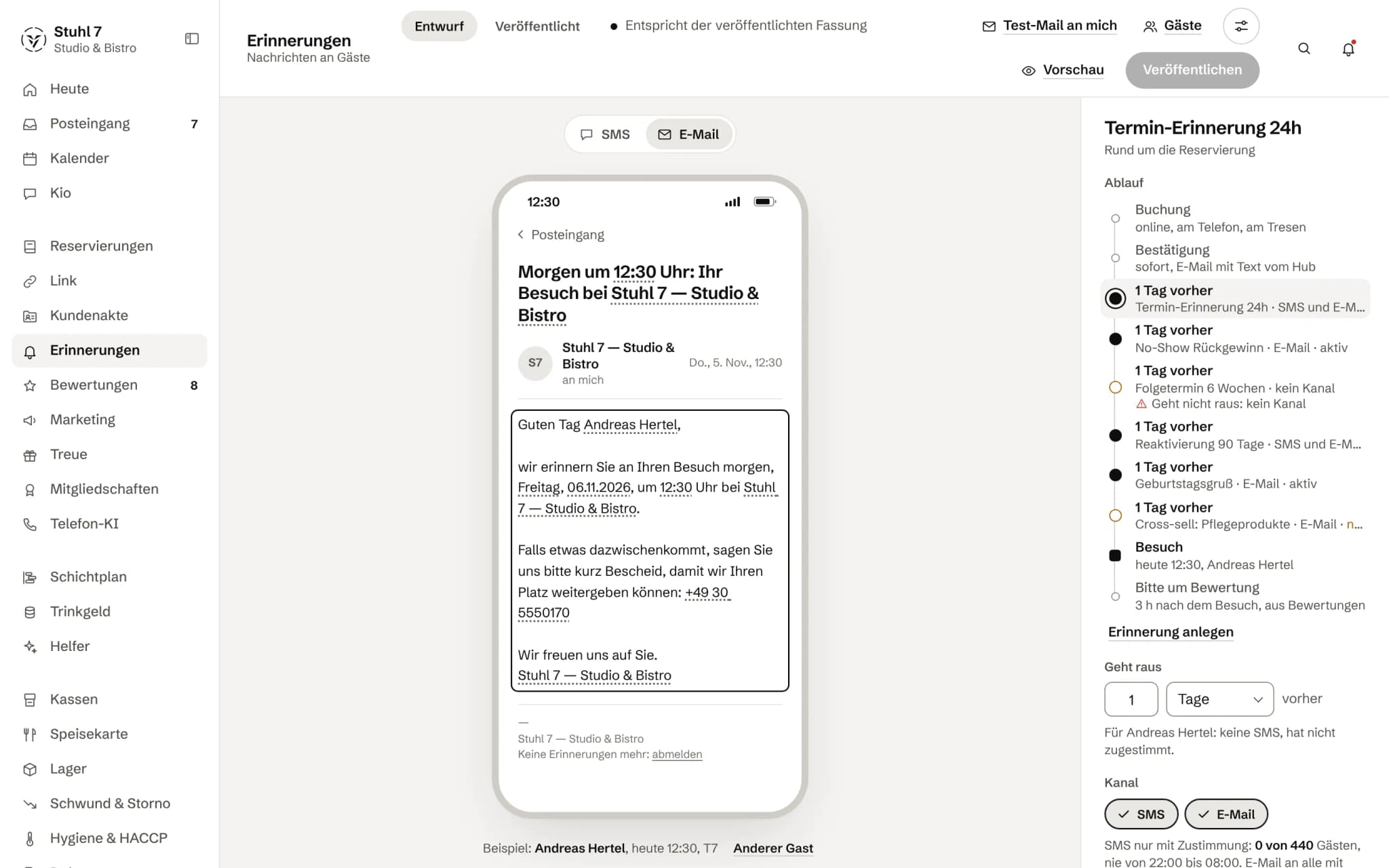
Two occasions
The start of a reservation or of an appointment from the appointment book, before or after, in minutes, hours or days, up to 30 days away.
Texts with real values
You write straight into the message as the guest will see it. Placeholders such as name, date, time, party size and table show the values of a real upcoming guest, and the templates come in the form of address you have chosen, formal or informal.
Preview and test send
The preview shows exactly the text that will be sent, unsubscribe note included. The test send to your own address or number goes the same way as the real reminder.
Show first, then send
You choose whether reminders and offers to people on the waitlist go out straight away or only after your tap. With “show first” the batch for tomorrow is ready the evening before (“Tomorrow: 12 reminders, send?”), you release it with one tap and untick single ones. It is sent at the planned time. New businesses start this way; existing ones stay on “automatic” until you switch.
Checked again before sending
Shortly before sending, the Hub reads the booking again. A cancelled reservation gets no reminder, even if one was already scheduled, and a moved appointment gets a new one.
No need to wait
Sending runs every hour. If you do not want to wait, you trigger it, and the Hub tells you when the scheduled reminders are due instead of just “nothing sent”.
02
Channels
Email for every booking, SMS only with consent.
Email in your venue's name
The email arrives as “your venue's name via Veydex”, in the look of your Veydex Link page if you have one, and always carries an unsubscribe link.
SMS only with consent
An SMS goes only to guests who have explicitly agreed. During your quiet hours it waits until they are over, and if that pushes a reminder past the start, it is not sent at all.
Budget and sender
For SMS you set a monthly budget and a sender name. When the budget is used up, the Hub says so instead of quietly sending on. 100 SMS a month are included; more go out only if you switch that on yourself and set a monthly limit.
Honest channel status
Each channel shows whether it is connected and, if not, why: for example, that SMS has not been enabled for your venue yet.
03
History and consent
You see what went out and what did not.
Every message in the history
For each message it shows recipient, channel, time and whether it was sent, skipped or failed, and for an SMS the error message too. Why an email about a reservation did not go out is shown in the reservation itself.
The guest's no
Unsubscribe link, STOP by SMS, “Reminders: no” in Guest records, a block: anyone with one of these gets no reminder, on any channel.
Objections by hand
If a guest says on the phone that they want no more messages, you enter it yourself. It applies from the next send.
Never twice
Each reminder goes to each recipient once per occasion, even if sending runs several times.
04
Appointment book
For businesses that give out appointments rather than tables.
Calendar with team and services
Appointments are tied to a service and a person. The Hub flags overlaps and times outside opening hours as a warning you can override on purpose; someone who is absent gets no appointments.
Confirmation link
A reminder for an appointment comes with a link the customer uses to confirm, cancel up to your deadline, or ask to reschedule. By SMS the same works with YES, NO and RESCHEDULE, or the German JA, NEIN and UMBUCHEN. The reminder for a table reservation carries a link too, to cancel or rebook.
Waitlist with offers
When an appointment frees up, the next person on the waitlist is offered exactly that slot for a limited time. On acceptance the Hub checks again; if the offer runs out, it goes to the next person.
Recall
If a service has an interval, anyone who last had it longer ago than that and has no new appointment gets an invitation by SMS. At most 25 go out per run, so the budget is not used up in a single morning.
What it does differently. And why that matters.
Who in the business gets what out of it.
Technical details and data
Timing
A reminder has a distance from the start, before or after, of up to 30 days. Sending runs every hour; reminders for appointments are scheduled when the appointment is created, so a short-notice one does not fall between two runs.
Placeholders
For reservations: guest, venue, phone, date, time, party size, table and link; for appointments: name, business, phone, service, person, date, time, weekday and link. A mistyped placeholder stays visible in the test instead of quietly disappearing.
Sender
Emails come without a reply address. A customer can only reply to an SMS if the sender is a number, not a name.
Permissions
Only the owner sets up reminders; test sends and immediate sends stay with the owner too. The owner and shift lead decide on the batches to release; only the owner switches between “show first” and “automatic”.
What it does not do today
Listed here so you know before, not once you are running it.
Reminders for reservations go to the address or number in Guest records, without a record to the phone and email of the booking.
If nothing is there, there is nothing to send, and an SMS needs the guest's consent.
A guest does not reply to the reminder for a reservation with “YES” or “NO”, but uses the link.
Cancelling works up to your business's cancellation deadline; after that the page asks for a phone call.
“Show first, then send” applies to reminders and offers to people on the waitlist, not to every email about a booking.
There is no fixed time such as “6 pm the day before”, only distances from the start.
There are no triggers for birthdays, “not seen for 90 days” or “after a missed appointment”.
WhatsApp and push are not connected yet.
SMS only go out once sending has been enabled for your venue.
Stronger together. Appointments without no-shows and the rest.
All modules work on the same data. What Appointments without no-shows knows, the others know too. Switch on what you need and see straight away what it costs together.

Your selection
29 €a month
- Appointments without no-shows29 €
Net plus VAT. Try it for 14 days, the trial ends by itself.
Appointments without no-shows costs
29 €/ month
- Try it free for 14 days, the trial ends by itself
- Cancel monthly without a fixed term, effective at the end of the paid month
- No base fee, no bundle
- All prices net plus VAT, for businesses only
Questions before you start
What businesses want to know before they switch it on.
Do I need Guest records for this?
No. Reminders about reservations take address and number from the record if there is one, otherwise from the phone and email of the booking; appointments from the appointment book carry their own contact. Without a record, though, the Hub does not recognise a returning guest. “Reminders: no” applies through the record or, without a link, through email and number.
What happens if a guest cancels after the reminder was scheduled?
Then it does not go out. The Hub reads the booking again shortly before sending; cancelled means no reminder. A moved appointment gets a new one for the new time.
May I send guests an SMS without consent?
The Hub does not. An SMS needs the guest's explicit consent, and a no in Guest records applies even if someone ticked “SMS allowed” on the booking.
What do the SMS cost?
100 SMS a month are included; each one beyond costs €0.12 net, but only if you switch that on yourself and set a monthly limit, at most 2,000. Without your consent it stops at 100, and the Hub tells you so.
How do I see whether a reminder went out?
The history shows for each message whether it was sent, skipped or failed. For an SMS the error message is shown, for a reservation email the reason in the booking's details.
Can I see beforehand what the guest will get?
Yes. The preview shows the finished text with the unsubscribe note, and the test send to your own address or number goes the same way as the real one.
Can a guest reply to the reminder?
Not to the email, which comes without a reply address. For appointments they use the link or reply by SMS with YES, NO or RESCHEDULE, if the sender is a number; for reservations they use the link. Whatever the Hub cannot match lands in your inbox.
Do I have to release every reminder myself?
Only if you set it up that way. With “show first, then send”, reminders and offers to people on the waitlist wait for your release, as a daily batch with one tap, and you untick single ones; with “automatic” they go out as set. New businesses start with “show first”, existing ones with “automatic”. A draft that no longer applies never goes out.
Does this work without reservations, in a salon for example?
Yes. The appointment book is part of Reminders itself: appointments with service and person, a reminder beforehand, the confirmation link, the waitlist and recall. You do not need Reservations for it.