
 Documents
Deadlines should not depend on someone remembering them.
Filing documents is easy. What is valuable is not missing their deadlines — including when the scan is not there yet.
Filing documents is easy. Not missing a deadline is what pays.
Veydex Documents keeps contracts, permits, records and their key dates together.
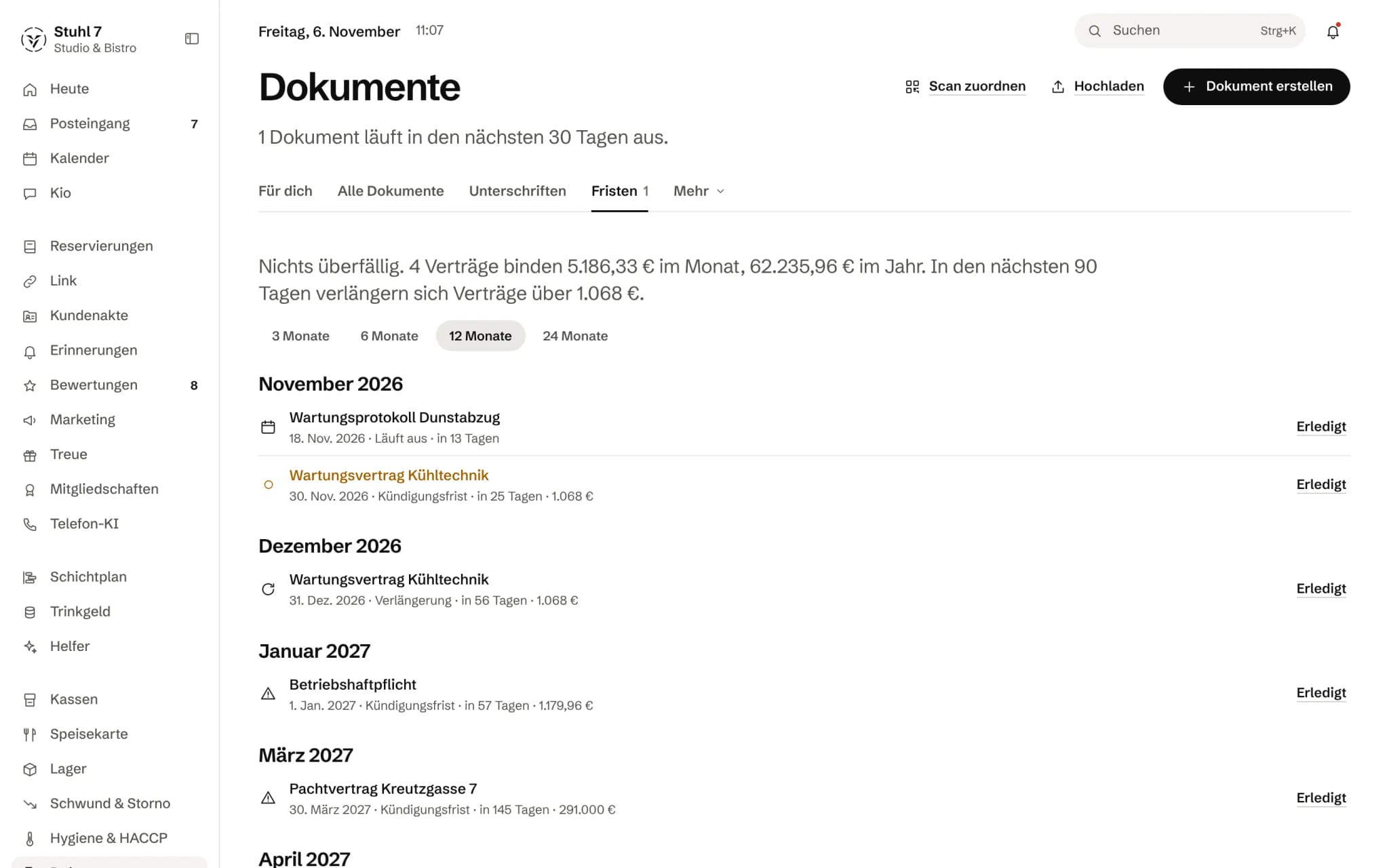
What contracts commit you to
How much is tied up in contracts each month and what renews soon.
Month by month
Deadlines and renewals month by month, up to two years ahead.
Notice periods worked out
Each contract's deadline with date, days left and amount.
More about Documents
You can record a deadline even when the scan itself is not there yet. Veydex checks it automatically and reminds you before a document turns into a problem.
A deadline
The deadline speaks up. You do not have to remember it.
The deadline hung on a date, not on somebody’s memory.
- 01The licence expires on 31 March. The date is in the Hub; the scan follows later.
- 1 MarchVeydex says: thirty days left. You set the lead time yourself.
- 28 MarchThe new certificate is in the Hub, the old document in the archive.
What is inside.
- Document management
- Seven categories
- Expiry dates
- Advance warnings
- Files
- Amounts
- Archiving
- Automatic deadline check
Ask Kio
Ask Kio instead of searching.
Kio reads along in the areas you have booked and answers in whole sentences, with the figures and where they come from.
Kio comes with every business: occasional questions are included in the Hub.
Meet Kio- You: What expires this month?
- Kio:
Two deadlines: the dishwasher service contract on the 14th and a health instruction in the team on the 28th. The scan for the instruction is still missing.
A document knows who it belongs to. And when it needs something from you.
Veydex Documents links contracts and records to a person, location, supplier or piece of equipment, works out their deadlines and turns a date into a task. Creating, signing and putting things together for an inspection are part of it.
01
Deadlines
Dates that speak up without anyone having to check.
The date before the scan
An expiry date can be entered before the file is there. Every document speaks up with the lead time you give it, thirty days by default, and once more when it has expired.
Notice periods worked out
From start date, minimum term, notice period and renewal, Veydex works out the last day to give notice, correct at month end too. A contract that renews quietly is rolled forward, not reported as expired.
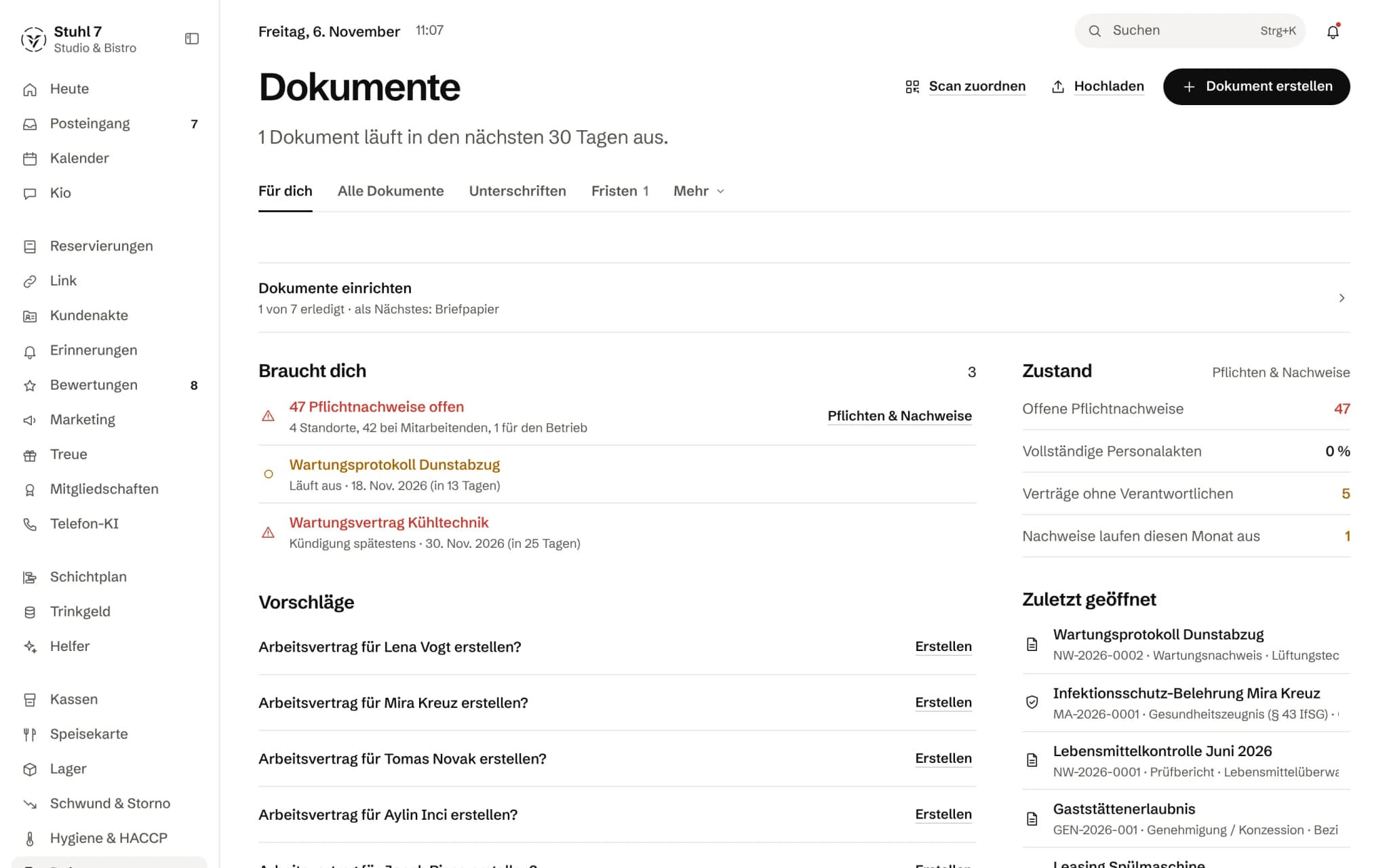
Deadline centre
Overdue and upcoming deadlines, the monthly cost of all running contracts and what renews in the next 90 days. Every contract can have someone responsible for it.
A deadline becomes an action
Automations on the pattern trigger, condition, action. Seven suggestions switch on with one click, such as “Record expired → request it again from the employee”.
02
Creating
Templates that take their values from the Hub.
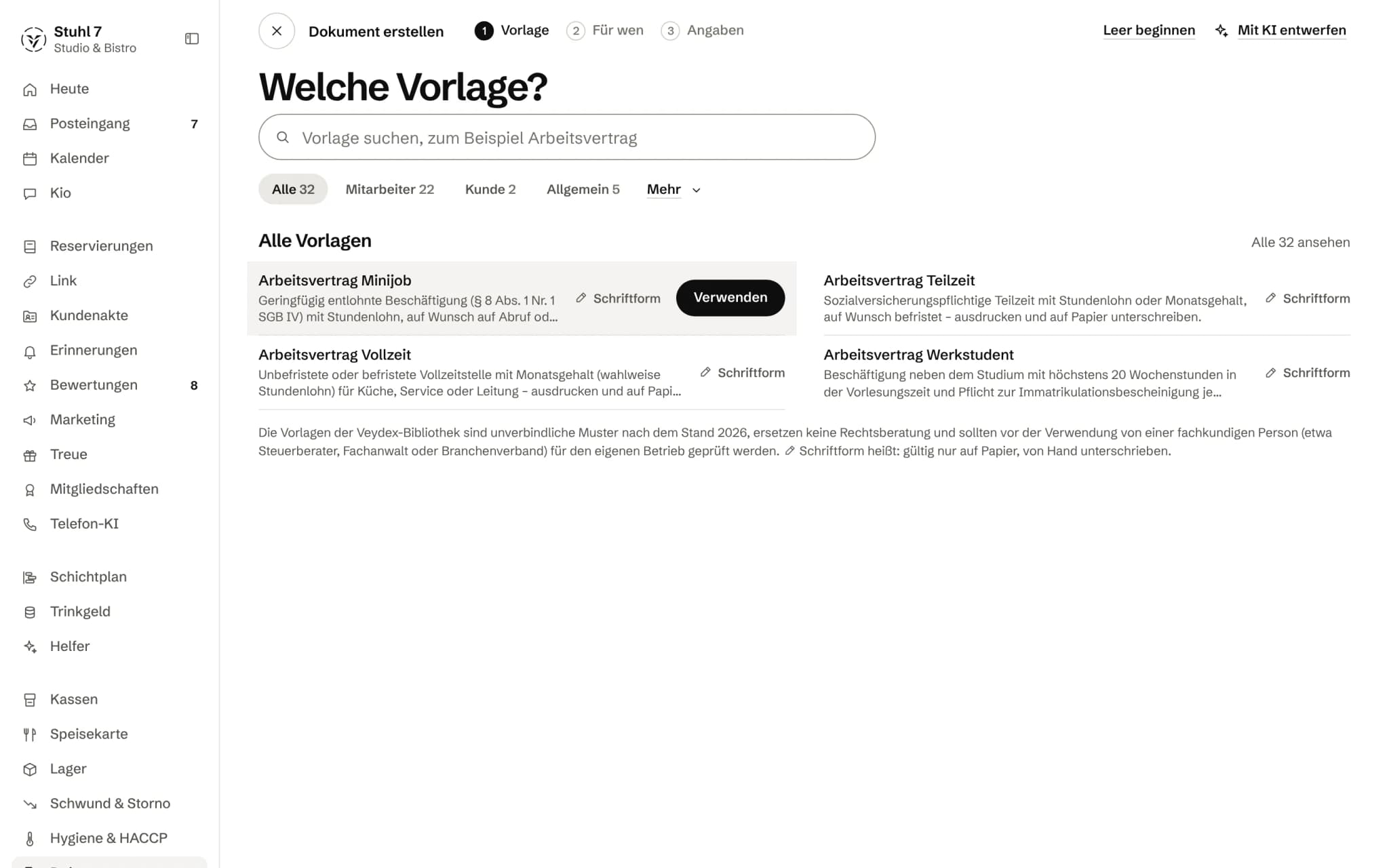
A library for hospitality
32 templates, from the employment contract through instructions and handover records to the reference letter, plus packages for a new hire, a leaver, a new supplier, a new location and a hygiene audit. What you take over is a copy: if the library changes, your contract does not quietly change with it.
Values from the Hub
Name, start date, location and letterhead come from what the Hub already knows. If a value is missing, the gap is marked in the draft, and the document stays a draft until it is filled.
One contract per type of employment
Mini-job, part-time, full-time, working student, temporary, with options for fixed term, probation and supplements. The options control paragraphs, and a fix to the holiday clause applies to every variant.
A QR code on the paper
Every generated document carries a random identifier and a QR code. The signed printout is photographed and lands on the right document; anyone scanning an old printout sees that it has been replaced.
03
Signing
Digital where the law allows it. On paper where it requires it.
Simple electronic signature
With an order, a deadline and a reminder every three days. The content is frozen when the signature is requested; time, IP, browser and checksum are logged, and at the end there is a certificate page.
Blocked where paper is required
Dismissal and termination agreements (§ 623 BGB) and the reference letter (§ 109 (3) GewO) cannot be signed digitally. Where the written form applies, Veydex asks explicitly and says that the simple signature does not replace it.
The employment contract in hospitality
As proof of terms it stays a paper document for restaurants and accommodation (Nachweisgesetz with § 2a SchwarzArbG). The route in Veydex: create it in the Hub, sign on paper, and the scan lands on the document via the QR code.
Signed means locked
After the last signature a locked version with an audit report is created. A signed document cannot be deleted.
04
Files and records
What is missing shows on the person, not only at the inspection.
Required records
Per employee, location and business, what has to be in place: employment contract, health certificate or first instruction under § 43 (1) IfSG, the instruction every two years, the annual training, licence, business liability insurance, fire safety inspection report and more. Every rule can be changed or switched off.
A traffic light that claims no more than it knows
Green means a matching document that has not expired is in place. Whether its content is right, the light does not know, and it does not say so either.
Request without an account
You request a missing record by link; the person uploads it without an account. Staff get a portal with one link that shows everything still open.
Inspection folder
For a food inspection, a workplace safety check or a tax audit, Veydex puts together what belongs and what is missing, as a ZIP or as a link for the inspector.
Files for location, supplier and equipment
The QR code on the cold room leads to the equipment file with maintenance contract and inspection reports.
05
Filing and finding
Upload without typing everything in first.
Recognition without a language model
From text PDFs and Word files Veydex reads type, dates, notice period, renewal, amount and assignment as a suggestion, by fixed rules.
Several files or a ZIP
Veydex spots duplicate files by their checksum. What comes in lands under “Please review”, and when in doubt it starts out as confidential.
Search the way you ask
Full text and sentences like “contracts that expire in 2027”, plus saved views and a comparison of two versions down to the word.
Questions to a contract
Summarise, put into plain language, translate or ask a question. Every answer names the paragraph it rests on.
What it does differently. And why that matters.
Who in the business gets what out of it.
Technical details and data
Law
Simple electronic signature under eIDAS Art. 3 No. 10. Blocked for dismissal, termination agreements (§ 623 BGB) and reference letters (§ 109 (3) GewO). A note to use paper for the employment contract in hospitality (Nachweisgesetz, § 2a SchwarzArbG) and for fixed terms (§ 14 (4) TzBfG).
Data protection
Three levels of confidentiality: internal, confidential, personnel. Every opening of a personnel document is logged, and exporting 20 or more personnel documents requires a confirmation.
Retention
Retention periods, legal hold and a deletion lock for anything signed. Thirty days after someone leaves, their personnel records are archived; nothing is deleted on its own. The periods are suggestions; what counts is what your tax adviser says.
Files
PDF, photos (JPEG, PNG, WebP, HEIC), Word and Excel, CSV and text. Veydex checks the type by the file's first bytes, not by its extension.
Export
A ZIP with the files, the pages of generated documents, an index.csv with all details and a readme. Documents from the staff file bring the receipt for their seal.
Allowance
300 actions a month for summarising, questions and translation. Everything else, including recognition on upload, runs without them.
What it does not do today
Listed here so you know before, not once you are running it.
There is no qualified electronic signature.
The simple one proves consent but does not replace the written form.
The templates are careful models, not contracts checked by a lawyer, and each one says so.
The module is not an audit-proof archive in the GoBD sense with a certification.
Photos and scans without a text layer are not read; recognition works with text PDFs and Word files.
There is no email inbox and no import from Google Drive, Dropbox or OneDrive.
The browser recognises the QR code in a photo.
Where it cannot, such as Safari on iPhone, you type in the identifier printed under the code.
Templates and packages exist for hospitality, not yet for hotels, bakeries or catering.
Stronger together. Documents and the rest.
All modules work on the same data. What Documents knows, the others know too. Switch on what you need and see straight away what it costs together.

Your selection
29 €a month
- Documents29 €
Net. Try it for 14 days, the trial ends by itself.

Complete staff file
What your team submits and signs in Veydex Shift lands in their file automatically. Missing records you request through the app.
44 € a month for both
Documents costs
29 €/ month
- Try it free for 14 days, the trial ends by itself
- Cancel monthly, with fourteen days' notice to the end of a billing month
- No base fee, no bundle
- All prices net
Questions before you start
What businesses want to know before they switch it on.
Can I enter a deadline before the scan is there?
Yes. The date is the reason for the entry, the file is not. The reminder applies from the moment of entry, and the scan is added when it arrives.
Does signing in the Hub replace the written form?
No. The simple electronic signature proves who agreed to which content and when. Where the law requires the written form, it does not replace it, and for dismissal, termination agreements and reference letters the digital route is blocked.
Can I have employment contracts signed digitally?
For restaurants and accommodation the Nachweisgesetz still requires proof of terms on paper, and a fixed term needs the written form anyway. The route in Veydex: create the contract in the Hub, print it, sign it and match the scan via the QR code.
Are the templates legally watertight?
They are careful models with explanatory notes, but no lawyer has checked them, and each template says so. Amounts such as the minimum wage or the mini-job limit are deliberately left out of the model text because they change; the contract refers to the minimum wage in force, and the hourly rate comes from the staff file.
Does my team see the documents?
Not in the Hub. Staff sign, confirm and upload through personal links or their portal, and together with the rota in Veydex Shift. Nobody in the team sees anyone else's personnel records.
How does Documents relate to the staff file in the rota?
The rota keeps the file from the person's side, Documents from the office's side. With both modules there is one file: what is valid in Veydex Shift appears here as a required record in deadlines, search and export, and a request from Documents lands in the person's app.
Can I get my records back out?
Any time, as a ZIP with the files, the pages of generated documents, an index.csv with all details and a readme. An inspection folder can therefore be read without Veydex as well.
Does Veydex read my contracts with a language model?
Recognition on upload does not; it works by fixed rules. Summarising, questions and translation use a language model, with 300 actions a month; the content of a document is treated as data, never as an instruction. Without these actions the module works in full.
One missed date costs more than a whole year of Veydex Documents.