
 Menu
A menu does not start with design. It starts with the data.
To the guest a menu is a sheet of paper; to the business it is a database: prices, taxes, allergens, cost of goods. When something changes, it should change in one place.
Your menu as the data behind the whole operation.
Veydex Menu & articles keeps products, variants, prices, taxes, allergens and additives together in one place.
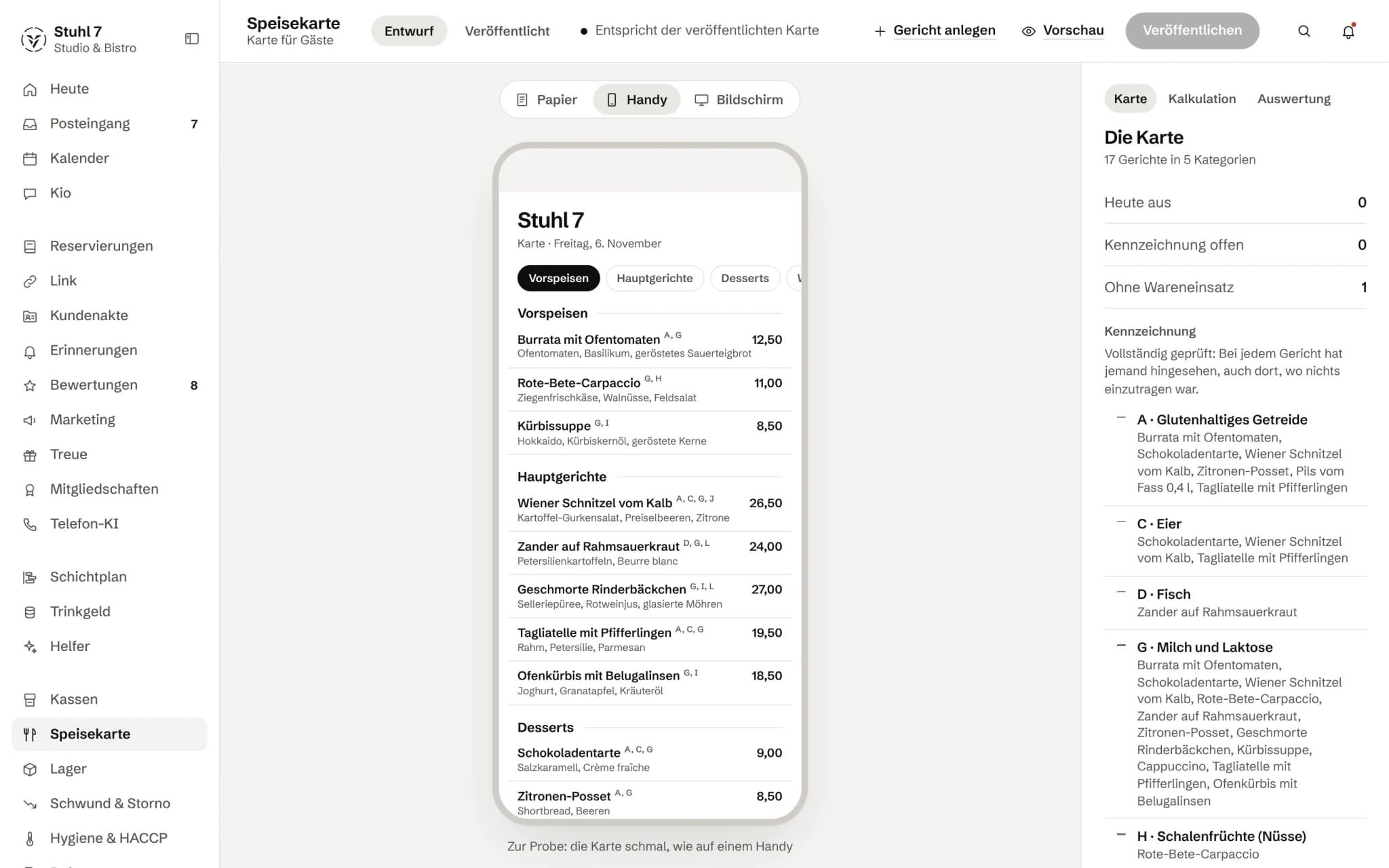
The menu on a phone
How guests see the menu, with the allergens on every dish.
Paper, phone, screen
View the same menu in three formats.
More about Menu
Margin per article and the basket analysis from your receipts also show which items are not just popular but actually earn money.
A price change
One price, one place, one log.
The data sits in the Hub. A price only goes back into your till where that has been set up for the connection. For guests there is the A4 print view; online the menu is shown through Veydex Link.
- 01The purchase price rises. You change the sale price in the Hub, in one place.
- 02Margin and costing compute with it from that moment, and the change goes into the log with the old price, the time and the person.
- 03Allergens and additives hang on the article, not on a sheet in the office.
- 04Costing sorts the menu by margin, the basket shows what a dish adds to the receipt. Only the two together say whether it earns its place on the menu.
What is inside.
- Articles & categories
- Variants
- Eat-in / takeaway taxes
- Allergens
- Additives
- Cost of goods
- Menu sorted by margin
- Price changes logged
- Basket analysis
The data lives in the Hub. For guests you print the menu as an A4 view from the Hub; online and by QR code it is shown through Veydex Link, which reads it live.
Ask Kio
Tell Kio. You approve.
Kio lays out the change with its reason, in the chat and in the inbox. Nothing runs until you say yes, and only the owner gets proposals.
Kio comes with every business: occasional questions are included in the Hub.
Meet Kio- You: The pumpkin risotto is off for today.
- Kio:
I am proposing to mark it as sold out. It only counts as sold out once you approve.
Mark as sold out
- Item
- Pumpkin risotto
Nothing happens until you approve.
One article master that everything refers to.
Price, VAT rates, cost of goods and labelling hang on one article. The lines from your till are matched to it, and only then do margin, recipe and basket work with real sales.
01
Articles
Everything an article needs sits in one place.
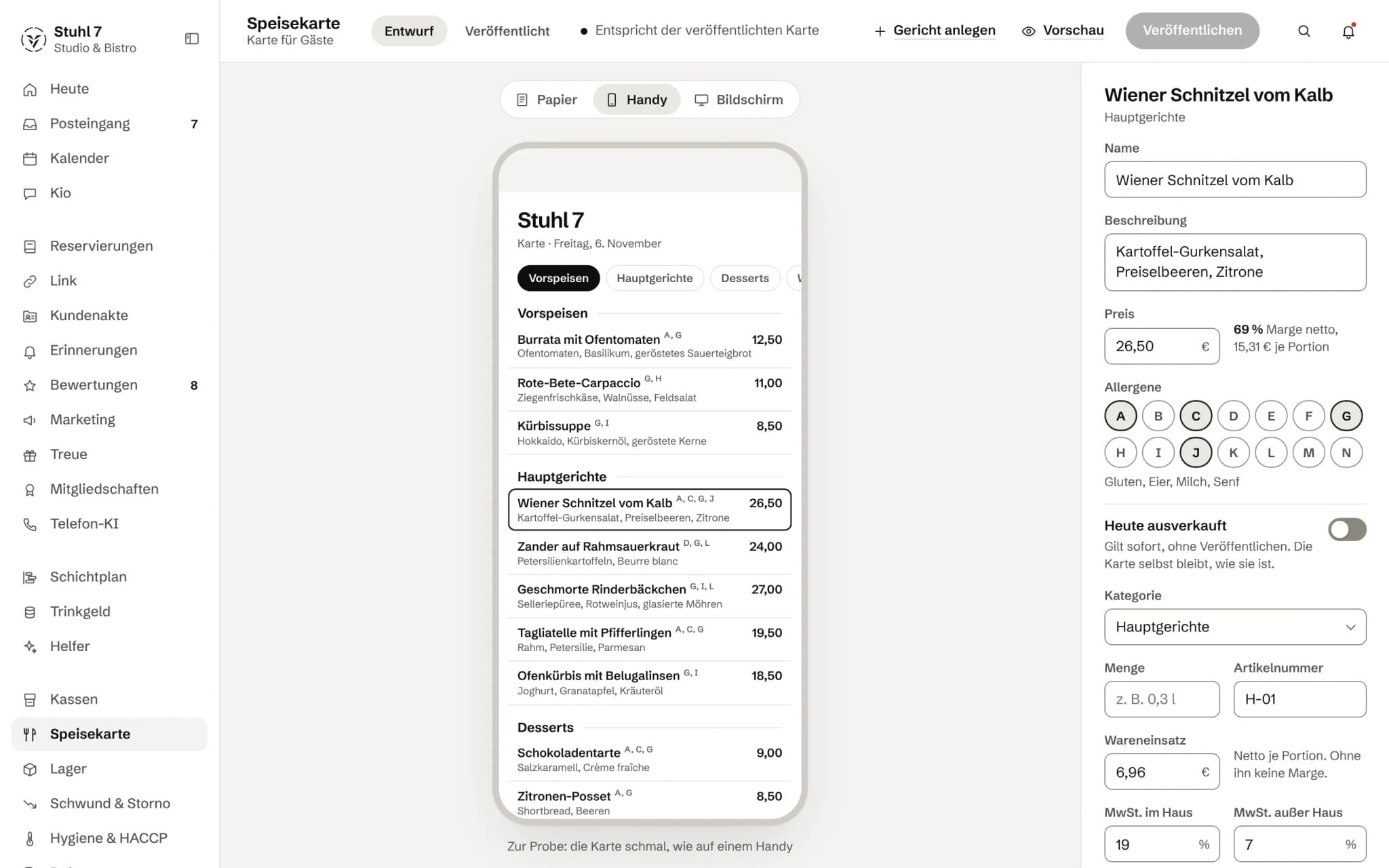
Price and two VAT rates
Every article carries its gross price and two VAT rates, eat-in and takeaway. The Hub calculates the margin on the net price, because VAT is not revenue.
Variants
Variants such as a small portion carry a surcharge or discount and an article number of their own. Cost of goods and recipe stay with the base article.
Unique article number
Each article number exists only once per business. The Hub matches your till's lines through it, so it rejects a duplicate.
Draft and “off today”
Changes to the menu collect as a draft until you publish. “Off today”, on the other hand, applies at once, from your phone too, and leaves the menu itself as it is.
Several sites
If your business has several sites, each gets its own price and its own “off today”. A site without its own price follows the company's.
02
Labelling
Allergens and additives as a fixed list, with the date someone actually looked.
Fixed lists
The 14 major allergens from Annex II of EU Regulation 1169/2011 and the additives with their numbers come as a fixed choice, not free text. That way they can be summarised and searched.
Checked, with a date
The Hub records when a dish's allergens were last checked. “Never checked” and “checked, none present” are two different states.
The open list
Dishes without checked labelling are listed separately, and one click opens the dish. These are exactly the ones an inspection finds.
The question at the table
The allergen report also works backwards: which dishes contain celery, which mustard, which nuts.
03
Costing
What a dish earns, not just what it costs.
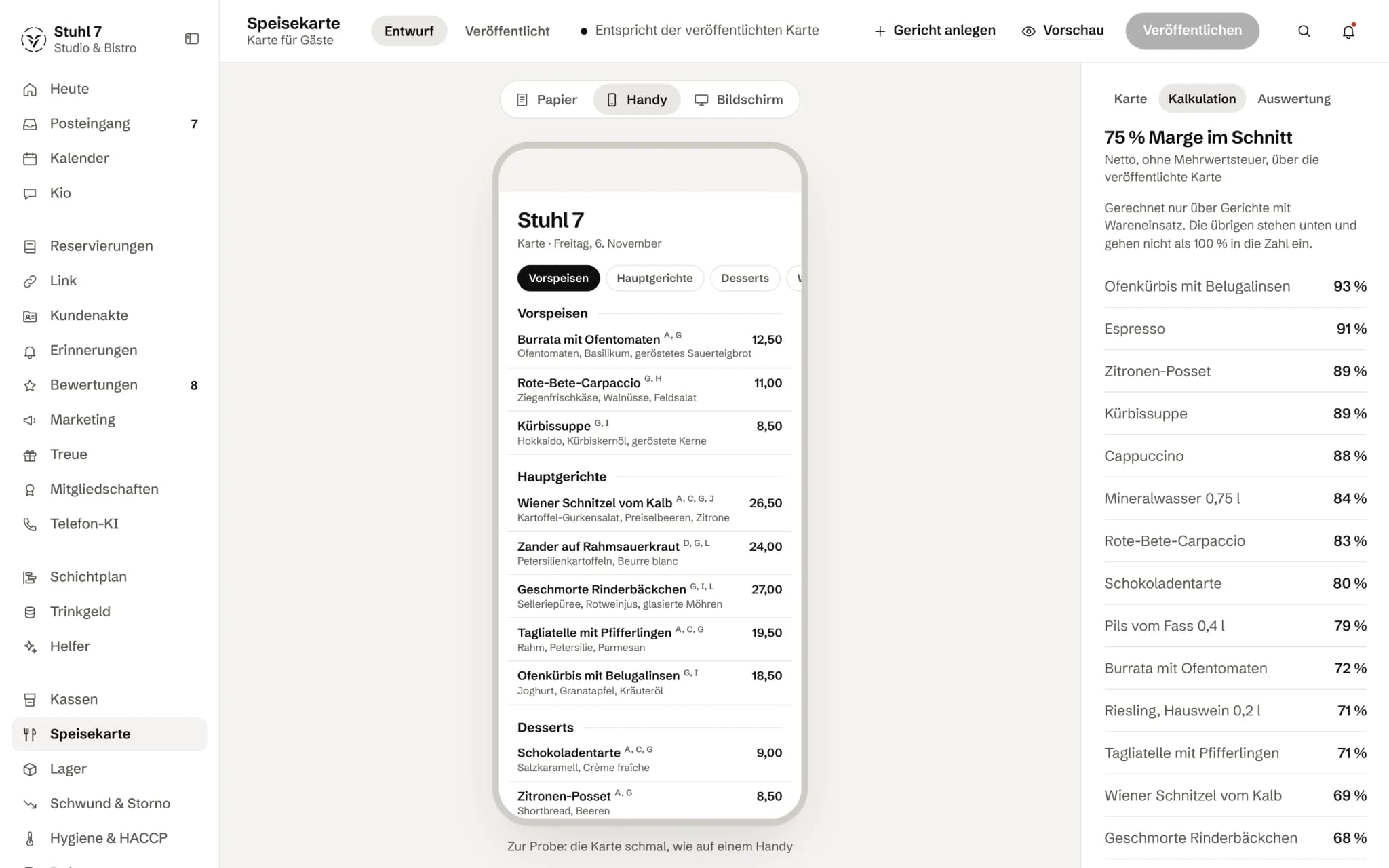
Margin on the article
With a cost of goods, every article shows its net contribution, in euros per portion and as a share. Without one, the margin stays empty rather than claim 100 %.
The menu by margin
Costing sorts the menu by margin and gives the average. Dishes without a cost of goods are listed alongside, and one click opens the dish at the right field.
From the recipe
With Stock, the cost of goods comes from the recipe, at the ingredients' purchase cost. It is only written to the article once every ingredient has a price.
Price changes on record
The Hub records every price change with old and new price, time and person.
04
Basket
What gets ordered together, from your till receipts.
What belongs together
From the receipts of the last 90 days the Hub works out which dishes are ordered together, on how many receipts, and how much more often than chance.
What a dish adds to the receipt
For every dish you see how much higher a receipt is on average when that dish is on it. A starter with a thin margin can earn its place that way.
No conclusions from too little
If there are too few receipts, the Hub draws no conclusion and says there are not enough yet.
05
Till matching
So that till and menu talk about the same articles.
Number first, then name
The Hub matches your till's lines by article number, otherwise by name if exactly one article fits. Spelling is evened out, quantities are not: “Cola 0.3 l” and “Cola 0.5 l” stay two articles.
Review list by revenue
Anything ambiguous goes onto a review list, sorted by revenue. If a name fits several articles, they are offered as candidates; the decision is yours.
Backwards too
A match applies to all receipts from that till, including the ones already there.
Not an article
Tips, deposits or vouchers you mark as “not an article”. They then count neither as open nor against coverage.
Coverage
The Hub shows what share of revenue is matched to an article. Otherwise a report that silently leaves lines out would look just like a complete one.
What it does differently. And why that matters.
Who in the business gets what out of it.
Technical details and data
Labelling
14 major allergens, A to N, under Annex II of EU Regulation 1169/2011; additives numbered 1 to 11 under the German additives regulation. Only the kitchen knows what a dish contains. The Hub provides the choice and records the check date.
VAT
Two rates per article, preset to 19 % eat-in and 7 % takeaway and changeable. Margin and contribution are calculated net at the eat-in rate.
Export
The menu as CSV with category, article number, size, price, cost of goods, contribution, both VAT rates, allergens, additives and check date.
Till data
Basket, matching and sales per article need receipts with line items. If a till only sends receipt totals, this part stays empty.
What it does not do today
Listed here so you know before, not once you are running it.
This module does not bring an online menu with a QR code.
For guests you print the menu as an A4 view from the Hub; online, Veydex Link shows it.
The Hub does not take over your till's article master, and there is no import for article lists.
You build the menu in the Hub.
The Hub calculates a ranking by contribution per kitchen minute as soon as a dish has an estimated preparation time.
The menu screen does not have a field for it yet.
The Hub works out from the price history how a price change affected sales, but does not show it on screen yet.
Menu does not hold nutritional values.
Stronger together. Menu and the rest.
All modules work on the same data. What Menu knows, the others know too. Switch on what you need and see straight away what it costs together.



Your selection
14 €a month
For new bookings from 1 December 2026: 19 € a month. Book or start your trial before then and you keep your price.
- Menufrom 1 December 2026: 19 €14 €
Net. Try it for 14 days, the trial ends by itself.
Menu costs
14 €/ month
- For new bookings from 1 December 2026: 19 € a month. Book or start your trial before then and you keep your price.
- Try it free for 14 days, the trial ends by itself
- Cancel monthly, with fourteen days' notice to the end of a billing month
- No base fee, no bundle
- All prices net
Questions before you start
What businesses want to know before they switch it on.
Do I have to build my menu again in the Hub?
Yes. The Hub does not take over your till's article master, and there is no list import. Name and price are enough to start; allergens, cost of goods and variants come when you are ready.
Does every article need an article number?
No. Without a number the Hub matches by name when exactly one article fits. The number is the firmer anchor, because it does not depend on how the till spells a name.
What happens to till lines that are ambiguous?
They go onto the review list, highest revenue first. If a name fits several articles, the candidates are shown. From then on your decision applies to every receipt from that till, including past ones.
Can guests see the menu?
On paper, yes: under “Menu for guests” you print it as an A4 view from the Hub. Online and by QR code not through this module; if you use Veydex Link, your Link page can read the offer straight from the menu. A changed price then shows there on the next visit, and allergens only where they have been checked.
What does “allergens checked” mean?
That someone has looked at this dish's allergens and saved them, even if there are none. The Hub records the date. Dishes where that has never happened are listed separately.
Where does a dish's cost of goods come from?
You enter it net per portion, or it comes from the recipe in Stock. A recipe only writes its cost to the article once every ingredient has a purchase cost. Without a cost of goods, the Hub shows no margin rather than an estimated one.
What does Nora do?
If you have booked the Helpers, Nora holds the menu against the cost of goods and flags articles that no longer pay their way. With Stock, she also flags dishes whose ingredients have run out according to the recipe.