 Reminders
The reservation stands. Veydex reminds them of it.
A guest who forgets their booking costs more than a message. Reminders sends it automatically, by email or SMS, and writes down what went out, what was skipped and why, and what failed.
Fewer forgotten appointments.
A guest who forgets their booking costs more than a message.
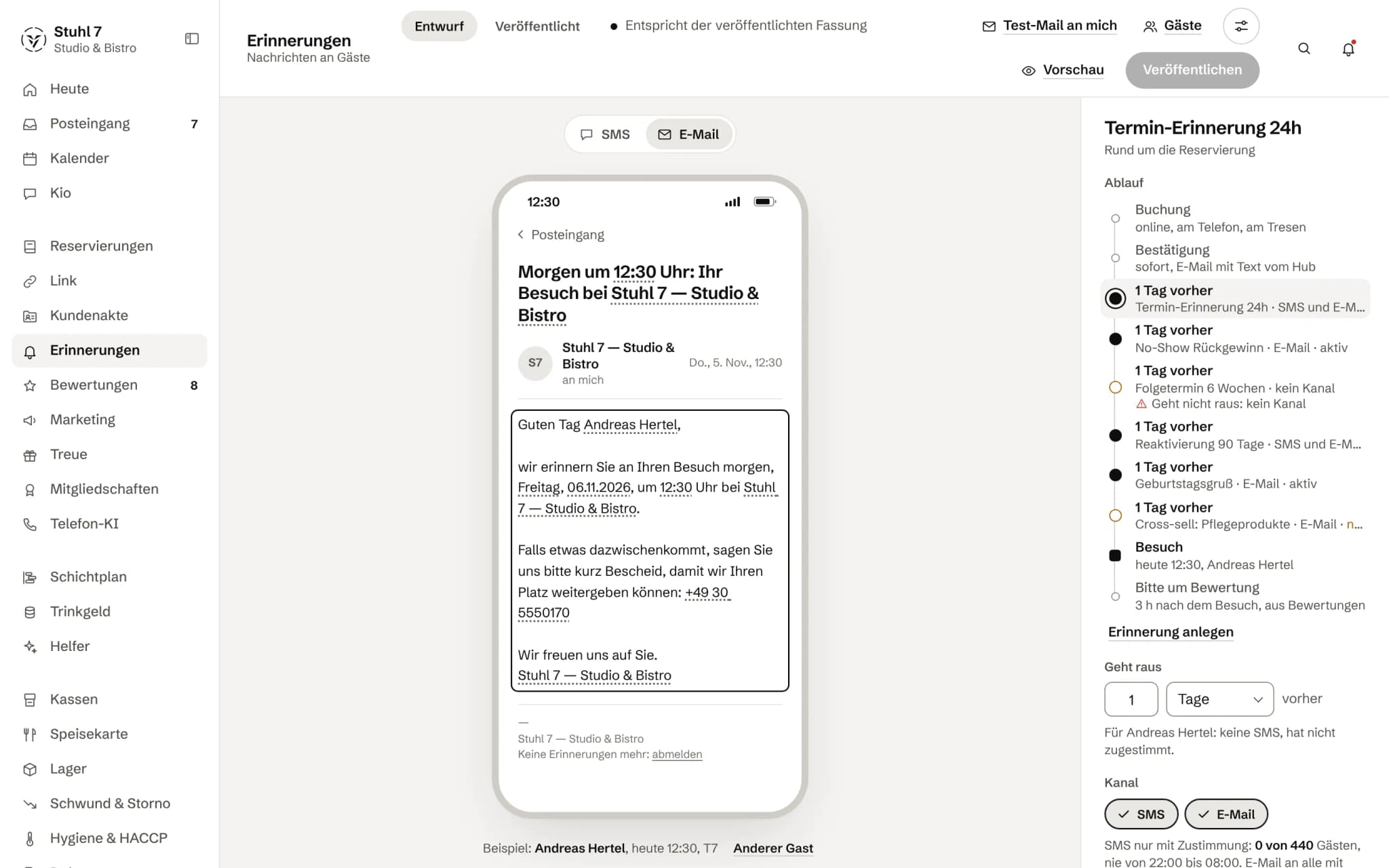
Preview with real values
The text as a guest would get it, with name, date and time from the reservation.
Text or email
See the same reminder in both channels.
More about Reminders
Veydex Reminders sends automatic email and SMS reminders before a reservation or appointment and records what went out, when, and whether anything failed.
You set the wording and the timing yourself. After that it runs in the background.
A reminder
Set it up. Switch it on. Stop thinking about it.
One empty table fewer, without anyone having to remember.
- Tue, 18:00The booking for Wednesday has been in the system for two weeks.
- Tue, 18:00Veydex sends the reminder with your text, at your offset.
- Tue, 18:00The send log says: sent. Had it been skipped, the reason would stand next to it.
- Wed, 19:00The table is taken.
What is inside.
- Email and SMS reminders
- Confirmation link for appointments
- Custom wording
- Lead time
- Test send
- Delivery log
- Unsubscribe link
Reservations need Guest records: the reminder takes address and number from there. Appointments from the appointment book work without it.
Ask Kio
Ask Kio instead of searching.
Kio reads along in the areas you have booked and answers in whole sentences, with the figures and where they come from.
Kio comes with every business: occasional questions are included in the Hub.
Meet Kio- You: How many reminders went out this week?
- Kio:
46 in the last seven days, two failed. Of the upcoming appointments, 38 of 52 may get a text; the others haven't agreed to it.
Reminders follow what is in the book. And go only to those who want them.
Reminders read reservations and appointments straight from the Hub, take the address from Guest records and leave out anyone who has said no. What went out and what did not is in the history.
01
Reminding
One message, at the distance you set.
Two occasions
The start of a reservation or of an appointment from the appointment book, before or after, in minutes, hours or days, up to 30 days away.
Texts with real values
You write straight into the message as the guest will see it. Placeholders such as name, date, time, party size and table show the values of a real upcoming guest, and the templates come in the form of address you have chosen, formal or informal.
Preview and test send
The preview shows exactly the text that will be sent, unsubscribe note included. The test send to your own address or number goes the same way as the real reminder.
Checked again before sending
Shortly before sending, the Hub reads the booking again. A cancelled reservation gets no reminder, even if one was already scheduled, and a moved appointment gets a new one.
No need to wait
Sending runs every hour. If you do not want to wait, you trigger it, and the Hub tells you when the scheduled reminders are due instead of just “nothing sent”.
02
Channels
Email for every booking, SMS only with consent.
Email in your venue's name
The email arrives as “your venue's name via Veydex”, in the look of your Veydex Link page if you have one, and always carries an unsubscribe link.
SMS only with consent
An SMS goes only to guests who have explicitly agreed. During your quiet hours it waits until they are over, and if that pushes a reminder past the start, it is not sent at all.
Budget and sender
For SMS you set a monthly budget and a sender name. When the budget is used up, the Hub says so instead of quietly sending on. If you book from 1 December 2026, 100 SMS a month are included; more go out only if you switch that on yourself and set a monthly limit.
Honest channel status
Each channel shows whether it is connected and, if not, why: for example, that SMS has not been enabled for your venue yet.
03
History and consent
You see what went out and what did not.
Every message in the history
For each message it shows recipient, channel, time and whether it was sent, skipped or failed, and for an SMS the error message too. Why an email about a reservation did not go out is shown in the reservation itself.
The guest's no
Unsubscribe link, STOP by SMS, “Reminders: no” in Guest records, a block: anyone with one of these gets no reminder, on any channel.
Objections by hand
If a guest says on the phone that they want no more messages, you enter it yourself. It applies from the next send.
Never twice
Each reminder goes to each recipient once per occasion, even if sending runs several times.
04
Appointment book
For businesses that give out appointments rather than tables.
Calendar with team and services
Appointments are tied to a service and a person. The Hub flags overlaps and times outside opening hours as a warning you can override on purpose; someone who is absent gets no appointments.
Confirmation link
A reminder for an appointment comes with a link the customer uses to confirm, cancel up to your deadline, or ask to reschedule. By SMS the same works with YES, NO and RESCHEDULE, or the German JA, NEIN and UMBUCHEN.
Waitlist with offers
When an appointment frees up, the next person on the waitlist is offered exactly that slot for a limited time. On acceptance the Hub checks again; if the offer runs out, it goes to the next person.
Recall
If a service has an interval, anyone who last had it longer ago than that and has no new appointment gets an invitation by SMS. At most 25 go out per run, so the budget is not used up in a single morning.
What it does differently. And why that matters.
Who in the business gets what out of it.
Technical details and data
Timing
A reminder has a distance from the start, before or after, of up to 30 days. Sending runs every hour; reminders for appointments are scheduled when the appointment is created, so a short-notice one does not fall between two runs.
Placeholders
For reservations: guest, venue, phone, date, time, party size and table; for appointments: name, business, phone, service, person, date, time, weekday and link. A mistyped placeholder stays visible in the test instead of quietly disappearing.
Sender
Emails come without a reply address. A customer can only reply to an SMS if the sender is a number, not a name.
Permissions
Only the owner sets up reminders; test sends and immediate sends stay with the owner too.
What it does not do today
Listed here so you know before, not once you are running it.
Reminders for reservations go to the address or number in Guest records.
If the booking is not linked to a record, the guest gets none.
The link to confirm, cancel or reschedule exists only for appointments from the appointment book, not for table reservations.
There is no fixed time such as “6 pm the day before”, only distances from the start.
There are no triggers for birthdays, “not seen for 90 days” or “after a missed appointment”.
WhatsApp and push are not connected yet.
SMS only go out once sending has been enabled for your venue.
Stronger together. Reminders and the rest.
All modules work on the same data. What Reminders knows, the others know too. Switch on what you need and see straight away what it costs together.


Your selection
9 €a month
For new bookings from 1 December 2026: 24 € a month. Book or start your trial before then and you keep your price.
- Remindersfrom 1 December 2026: 24 €9 €
Net. Try it for 14 days, the trial ends by itself.
Reminders costs
9 €/ month
- For new bookings from 1 December 2026: 24 € a month. With it: 100 SMS a month included; beyond that €0.12 per SMS, only if you switch it on yourself. Book or start your trial before then and you keep your price.
- Try it free for 14 days, the trial ends by itself
- Cancel monthly, with fourteen days' notice to the end of a billing month
- No base fee, no bundle
- All prices net
Questions before you start
What businesses want to know before they switch it on.
Do I need Guest records for this?
For reminders about reservations, yes: they take address and number from the record, and without a linked record the guest gets none. Appointments from the appointment book carry their own contact and work without it.
What happens if a guest cancels after the reminder was scheduled?
Then it does not go out. The Hub reads the booking again shortly before sending; cancelled means no reminder. A moved appointment gets a new one for the new time.
May I send guests an SMS without consent?
The Hub does not. An SMS needs the guest's explicit consent, and a no in Guest records applies even if someone ticked “SMS allowed” on the booking.
What do the SMS cost?
If you book Reminders by 30 November 2026, you send 500 SMS a month at no extra cost and keep that. For bookings from 1 December 2026, 100 SMS a month are included; each one beyond costs €0.12 net, but only if you switch that on yourself and set a monthly limit, at most 2,000. Without your consent it stops at 100, and the Hub tells you so.
How do I see whether a reminder went out?
The history shows for each message whether it was sent, skipped or failed. For an SMS the error message is shown, for a reservation email the reason in the booking's details.
Can I see beforehand what the guest will get?
Yes. The preview shows the finished text with the unsubscribe note, and the test send to your own address or number goes the same way as the real one.
Can a guest reply to the reminder?
Not to the email, which comes without a reply address. For appointments they use the link or reply by SMS with YES, NO or RESCHEDULE, if the sender is a number. Whatever the Hub cannot match lands in your inbox.
Does this work without reservations, in a salon for example?
Yes. The appointment book is part of Reminders itself: appointments with service and person, a reminder beforehand, the confirmation link, the waitlist and recall. You do not need Reservations for it.