
 Hygiene & HACCP
Documented before anyone asks for it.
HACCP rarely fails on willingness and almost always on timing: it gets written up in the evening from memory, not in the morning at the cold room. Veydex moves the record to where the check happens.
HACCP that works in the day.
Veydex HACCP brings daily checks, limits and records into the working day itself.
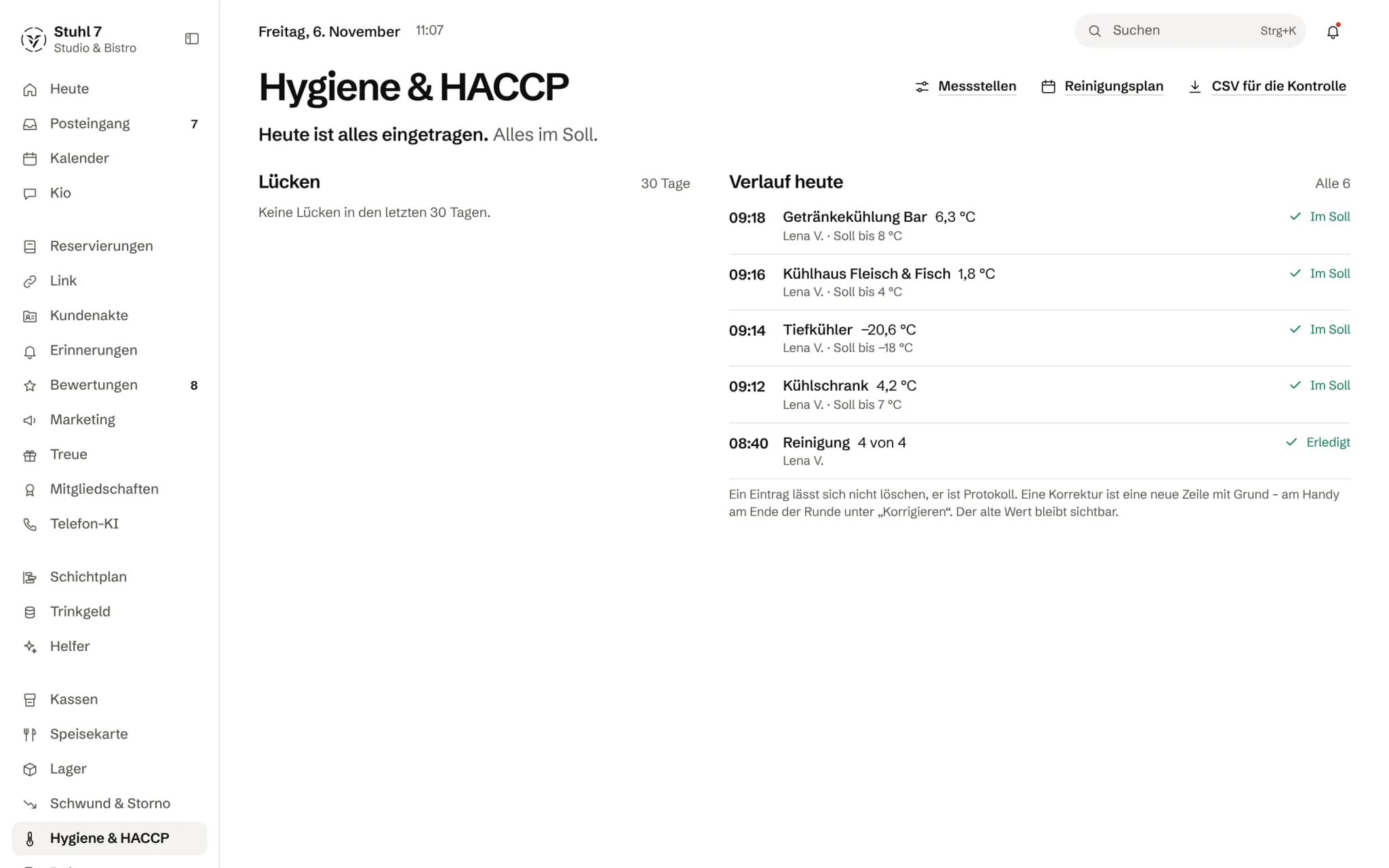
Every reading against its target
Time, value, who measured it and what the target is.
Cleaning
The cleaning round with the points done.
A record
An entry cannot be deleted; a correction is a new line with a reason.
More about Hygiene & HACCP
Staff record values and document deviations; Veydex does not accept a deviation without a measure. Missing checks become visible before they stand out in an inspection.
A check
The value is captured where it occurs.
You spot the gap. Not the inspection.
- 07:40Cold room. The value is captured at the unit, not estimated that evening.
- 07:405.8 °C is above the target range. Veydex requires an action.
- 07:52Measure and note sit on the same entry, with the target range that applied at 07:40.
- 18:00If a check is missing, the today view shows the gap. Not the inspection.
What is inside.
- Control points
- Target ranges
- Temperature and value capture
- Measures
- Today view
- Gap check
- CSV output
Ask Kio
Ask Kio instead of searching.
Kio reads along in the areas you have booked and answers in whole sentences, with the figures and where they come from.
Kio comes with every business: occasional questions are included in the Hub.
Meet Kio- You: Which checks are still open today?
- Kio:
Two: the cold room at 2 pm and the dishwasher in the evening. Tell me the value and I lay the reading out for your approval.
Measured at the cold room. Assessed in the same moment.
Every record carries the target range that applied when it was taken. A deviation only goes into the log with a corrective action, and anything missing shows in the today view before an inspection finds it.
01
Checkpoints
What is checked, how often and within which range.
A starter set for every kitchen
Fridge up to 7 °C, freezer at −18 °C or colder, goods in with temperature and visual check, cleaning daily, frying oil weekly. The values are guide values for the normal case, and you change them per checkpoint.
Frequency
Daily, twice daily, weekly or per delivery. A goods-in check without a delivery is not a gap, and a weekly check is measured against the week, not the day.
Checklists
A checkpoint can be a list of yes-or-no items, up to 30. An item left unticked is a deviation just like a temperature that is too high, and the wording is fixed with the record.
Retire instead of delete
A checkpoint that no longer exists is retired. Its records stay readable, because retention also applies to a cold room that has been removed.
02
Measuring
A round on the phone, one checkpoint after another.
Target band while typing
A large keypad, and the target band shows while you type whether the value is inside.
No deviation without an action
If a value is outside, the round asks straight away what was done. Without an action the server does not accept the record. Suggestions such as “Goods moved to another fridge” save typing.
Assessment fixed
Value, target range and assessment sit on every record. Whoever changes the target range later does not turn a past deviation into an unremarkable reading.
With name and time
Every line says who measured and when. A deviation also appears with its reason in the Hub's notifications.
On the tablet
Where a tablet hangs in the kitchen, entries are made there, with the current time.
03
Gaps
You spot what is missing. Not the inspection.
Today view
What is still missing today or this week, checkpoint by checkpoint. The Hub's overview reads the same calculation.
Gap list
Over 7, 30 or 90 days, what was missed. A checkpoint cannot have missed anything before it was created, and the current week does not count as a gap yet.
Cleaning plan
The week as a grid: seven days per task, done, open or overdue, with time and name on every cell.
04
Records
A log that cannot be massaged.
Nothing is deleted
A correction is a new line with a reason. The old value stays visible.
Entered later, with a note
If the paper slip is still there, you enter it later. The record carries the day it was measured and a note that it was entered afterwards.
Inspection report as CSV
Day, time, checkpoint, value, target range, assessment, action, remark, who measured and, for checklists, every item with yes or no. Umlauts come out right in Excel too.
With Documents
If you also have Documents, you link maintenance records and inspection reports to the checkpoint and use the hygiene audit package to gather what a food inspection wants to see.
What it does differently. And why that matters.
Who in the business gets what out of it.
Technical details and data
Law
Self-checks on HACCP principles, as every business that supplies food must keep them. The starting values are guide values for the normal case and not legal advice; your own food safety plan is what counts.
Permissions
The whole team can enter values. Checkpoints, target ranges, gaps, cleaning plan and export: owner and shift lead. Retiring: owner only.
Devices
The round runs on the phone. On the computer you have gaps, history and settings, and on a tablet you can enter values directly.
Export
Semicolon-separated CSV. From the interface you download the last 30 days.
Notifications
Every deviation appears in the Hub's notifications with checkpoint and reason.
What it does not do today
Listed here so you know before, not once you are running it.
Values are typed in by a person.
Temperature sensors that measure and send by themselves are not connected.
The module sends no reminder to the phone when a check is due.
Open items show in the today view and on the overview.
Veydex does not write the HACCP plan with its hazard analysis.
That belongs alongside as a document.
Readings and documents have no shared inspection view.
The report on the readings is a separate file.
Instructions under § 43 IfSG and training records are not kept in this module but in Documents or in the staff file of the rota.
The interface does not yet offer a photo on a record.
Action and remark are kept as text on the entry.
Stronger together. Hygiene & HACCP and the rest.
All modules work on the same data. What Hygiene & HACCP knows, the others know too. Switch on what you need and see straight away what it costs together.

Your selection
12 €a month
For new bookings from 1 December 2026: 19 € a month. Book or start your trial before then and you keep your price.
- Hygiene & HACCPfrom 1 December 2026: 19 €12 €
Net. Try it for 14 days, the trial ends by itself.
Hygiene & HACCP costs
12 €/ month
- For new bookings from 1 December 2026: 19 € a month. Book or start your trial before then and you keep your price.
- Try it free for 14 days, the trial ends by itself
- Cancel monthly, with fourteen days' notice to the end of a billing month
- No base fee, no bundle
- All prices net
Questions before you start
What businesses want to know before they switch it on.
Which checkpoints do I need to start with?
The starter set creates the five every kitchen keeps: fridge, freezer, goods in, cleaning and frying oil, with the usual target values. What already exists it does not create twice. Whatever is different for you, you change afterwards.
What happens with a deviation?
The round asks for the action, and without it nothing is saved. After that the deviation and its action are in the history, in the notifications and in the inspection report.
Can I correct a wrong value?
Yes, as a new line with a reason, such as “typo” or “wrong checkpoint”. The old value stays; a record cannot be deleted.
May I enter forgotten readings afterwards?
If the paper slip is still there, yes. The record gets the day of the reading and a note, and in the inspection report it can be recognised as entered later.
What do I show at a food inspection?
The inspection report for the last 30 days as CSV, and the week's cleaning plan. With Documents, instructions, training and maintenance records come in through the hygiene audit package.
Where do the instructions under § 43 IfSG go?
Not in this module. Documents keeps them as a required record per employee, the follow-up instruction valid for two years, and reports when one is missing or about to expire. The staff file in the rota accepts them as a signed record.
Does it work with wireless thermometers?
No. Values are typed in, on the phone with a large keypad that shows while you type whether the value is within the target range.
Can I attach a photo?
Not yet. The action and a remark sit as text on the record, with value, time and name. Photos of delivery notes or inspection reports you file in Documents and link to the checkpoint.
Do not catch up on hygiene. Document it at the moment of the check.