 Shrinkage & voidsNeeds matching till data
Do not make every void suspicious. Spot what stands out.
Whoever causes the largest void total has usually simply worked the most. So Veydex does not ask about totals, it asks what stands out.
See what stands out, without accusing people too soon.
Veydex Shrinkage & voids does not simply work out who caused the largest void total.
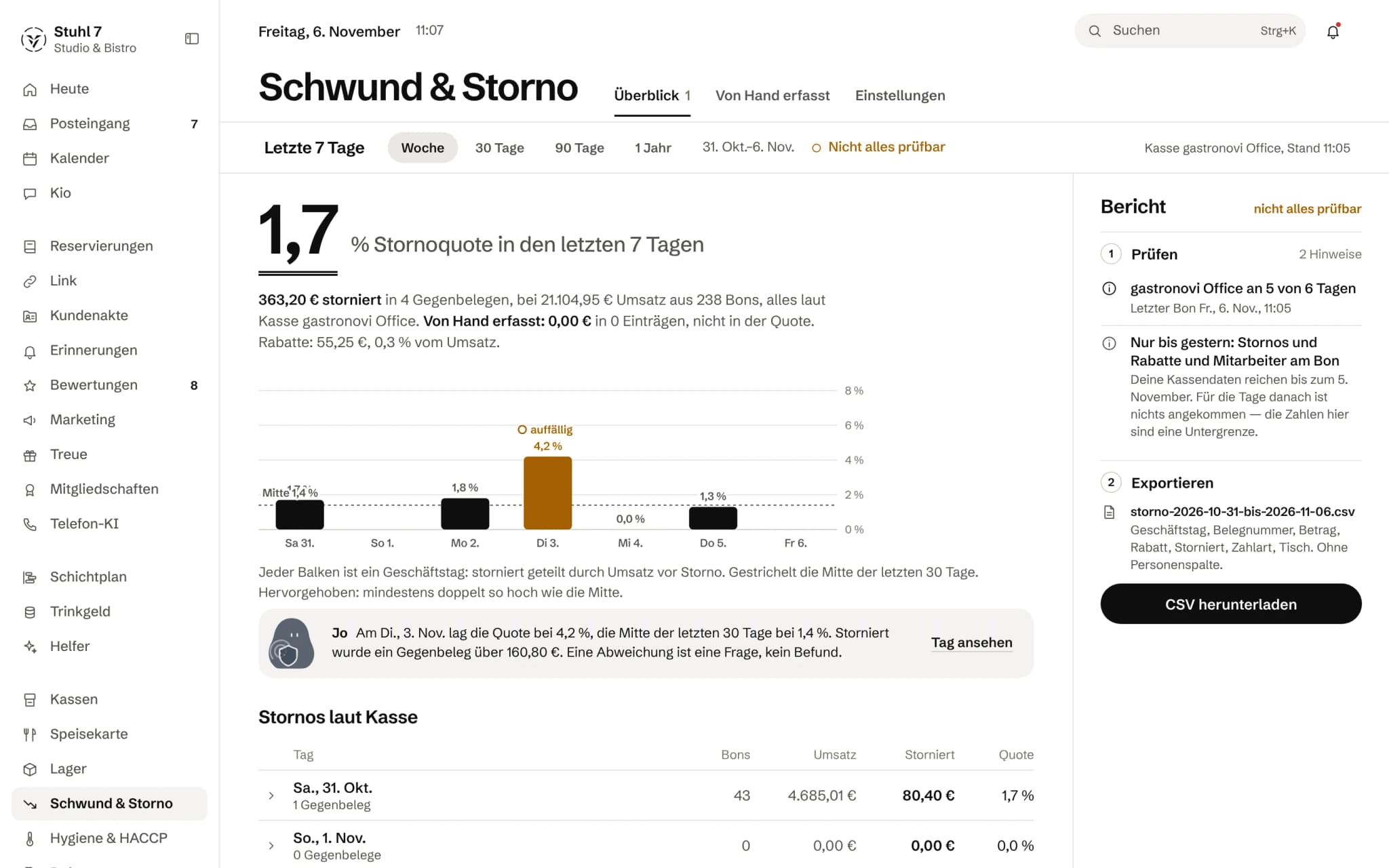
One bar per business day
Voided amount divided by revenue. Highlighted is anything at least twice the median.
The median as a line
Dashed, the median of the last 30 days that every day is measured against.
A question, not a finding
The helper Jo points out the unusual day without accusing anyone.
Voids according to the till
Receipts, revenue, voided amount and rate per business day, with no names.
More about Shrinkage & voids
Instead it shows what really stands out — fairly, so that staff who work a lot do not automatically look like a problem.
Personal attribution stays deliberately controlled and can only be switched on under defined conditions.
A month of voids
Do not make every void suspicious.
What stands out is the deviation, not the person.
- 01214 voids in the month. The question is not who, but what breaks the pattern.
- 02Veydex works with the void rate, not the total — whoever rings up a lot does not stand out automatically.
- 03One business day sits clearly above the middle of the last 30 days.
- 04Analysis per till ID stays off until the owner switches it on under defined conditions.
What is inside.
- Void rates
- Discount analysis
- Anomalies
- Aggregated analysis
- Controlled personal attribution
- Export
The module needs void and discount data in full depth. Whether your till delivers it, we establish before you book — otherwise you do not book it.
Needs matching till dataBookable once your till delivers the required data. The till check tells you whether it does.
Ask Kio
Ask Kio how it works.
Kio answers from the same help articles as on veydex.com and links the article. If he finds none, he says so instead of making up a path.
Kio comes with every business: occasional questions are included in the Hub.
Meet Kio- You: Where do I enter breakage that never went through the till?
- Kio:
In Shrinkage & voids under “Recorded by hand”: choose “Record by hand”, add quantity and value and pick “Breakage” as the reason. It never counts towards the void rate.
First the question whether there is a problem. Then, if needed, where.
Shrinkage & voids answers the first question without names: rate, trend and spread across the whole business. Analysis per till ID is a switch only the owner can flip, and the log records when.
01
Overview without names
Whether there is a problem, without saying who.
Rate, not total
What gets calculated is the void rate, voided amount divided by revenue before voids, not the void total. Whoever rings up a lot also voids more; a list by total reliably puts your hardest worker at the top.
Discounts on their own
Discounts only count on valid receipts and are shown as a rate of their own. A voided receipt does not enter shrinkage twice.
The spread
Without names, the Hub shows how far the rate varies between register IDs: lowest, middle, highest. If they sit close together, a high rate is more likely down to the process than to individuals.
Void or reversal receipt
Whether your till marks a receipt as voided or writes a reversal receipt, the rate treats both the same.
02
Trend
Every business day with its rate, so a pattern can be told apart from an outlier.
One bar per day
Every business day shows its void rate, with the middle of the last 30 days as a dashed line. A day at least twice as high is highlighted.
The day in detail
One click on the day shows how much was voided in how many reversal receipts, on what revenue from how many receipts, plus discounts and anything recorded by hand.
No gaps
A day without voids shows as zero instead of disappearing. Otherwise the curve would jump wherever nothing happened.
Periods
Week, 30 days, 90 days or one year.
03
Per till ID, only with the switch
For the case where the question of where really has to be asked.
A deliberate switch
Analysis per till ID is off until the owner turns it on. Who did that and when is shown with it, and turning it on and off is logged.
Minimum group size
Below a minimum number of people, the Hub shows nothing even then. In a small group, every total is personal.
Measured fairly
What stands out is whatever clearly breaks away from the business's own range. A single outlier cannot shift the threshold so far that it hides itself.
A question, not a finding
In the Hub a deviation stands as a question, not as a verdict on a person.
04
Recorded by hand
What never goes through the till gets a total of its own.
Five reasons
Breakage, spoilage, theft, staff meals and other: you record them with quantity, unit and value, optionally with stock article, site and a note.
Kept apart from the rate
These entries appear as a separate total next to the rates, never inside them. A rate with one count from the till and one from a note would be unreadable.
Plausible or rejected
The Hub rejects unrealistic quantities and values, so a slipped decimal point does not quietly end up in the total.
Deleting leaves a trace
An entry can be deleted, but the log records what was deleted. A theft entry that could vanish without a trace would not be one.
05
What can be checked
No all-clear on data that never arrived.
Field by field
The Hub shows separately whether your till sends voids, discounts and the till ID on the receipt. A till can report voids and not discounts.
Not everything can be checked
If a field is missing, it says “not everything can be checked”, not “nothing unusual”. Otherwise a rate of zero would be an all-clear on an empty field.
A silent till
If nothing has come from the till for a period, that is shown too, with the date of the last data.
What it does differently. And why that matters.
Who in the business gets what out of it.
Technical details and data
Data
It needs voids and discounts on the receipt and, for analysis per person, the till ID. Which of these your till sends is shown by the till check before you book.
Export
CSV with business day, receipt number, amount, discount, voided, payment method and table. No person column, even when analysis per till ID is on.
Law
Section 87(1) no. 6 of the German Works Constitution Act: aggregated by default, personal attribution only with a switch and a log entry, nothing shown at all below a minimum group.
Period
Analysis over up to one year. Entries by hand can be backdated up to a year, not dated in the future.
What it does not do today
Listed here so you know before, not once you are running it.
The module needs void and discount data in full depth.
If your till does not deliver it, you do not book the module.
Whether you may switch on analysis per till ID is not for the Hub to decide.
If there is a works council, it needs the council's consent.
Receipts without a till ID count towards the business's rate, but not towards any analysis per person.
Only the owner can record entries by hand.
Stronger together. Shrinkage & voids and the rest.
All modules work on the same data. What Shrinkage & voids knows, the others know too. Switch on what you need and see straight away what it costs together.

Your selection
19 €a month
- Shrinkage & voids19 €
Net. Try it for 14 days, the trial ends by itself.
Shrinkage & voids costs
19 €/ month
- Try it free for 14 days, the trial ends by itself
- Cancel monthly, with fourteen days' notice to the end of a billing month
- No base fee, no bundle
- All prices net
Questions before you start
What businesses want to know before they switch it on.
Does my till deliver what the module needs?
We establish that before you book, and without void and discount data in full depth you do not book it. Afterwards the Hub shows field by field whether voids, discounts and the till ID arrive; if something is missing, it says “not everything can be checked”.
Can my team see who voids how much?
No. Staff have no access to this module. Even the owner only sees till IDs after deliberately switching that analysis on.
What happens when I switch on analysis per till ID?
The Hub records who switched it on and when, and shows the rates per ID once enough people with till IDs come together. Below that it stays with the overall view. Switching off removes the record again; both are logged.
Why a rate and not a total?
Because the total mainly measures who works the most. Whoever rings up half the evening also voids the most receipts. The rate puts every void in relation to that person's own revenue.
Where do breakage and spoilage go that never touched the till?
Into the entries by hand, with reason, quantity and value. They appear as a separate total next to the rates and never mix with the till data.
What does Jo do?
If you have booked the Helpers, Jo, the till watch, looks out for days with an unusual void or discount rate. He reports patterns, never people, and he stays at observing for good.
Can my accountant see the figures?
With the Accounting access they read rates and trend and download the export, without being able to change anything. The export has no person column.