 Payments
Take payment without pulling the transaction out of Veydex.
A payment belongs in the Hub your business runs on — not in a second portal with its own login. And the money belongs in your account, not in a provider's holding account.
Payment where the transaction happens.
With Veydex Payments you create payment links straight out of your operating system and keep payments, refunds and payouts in one view.
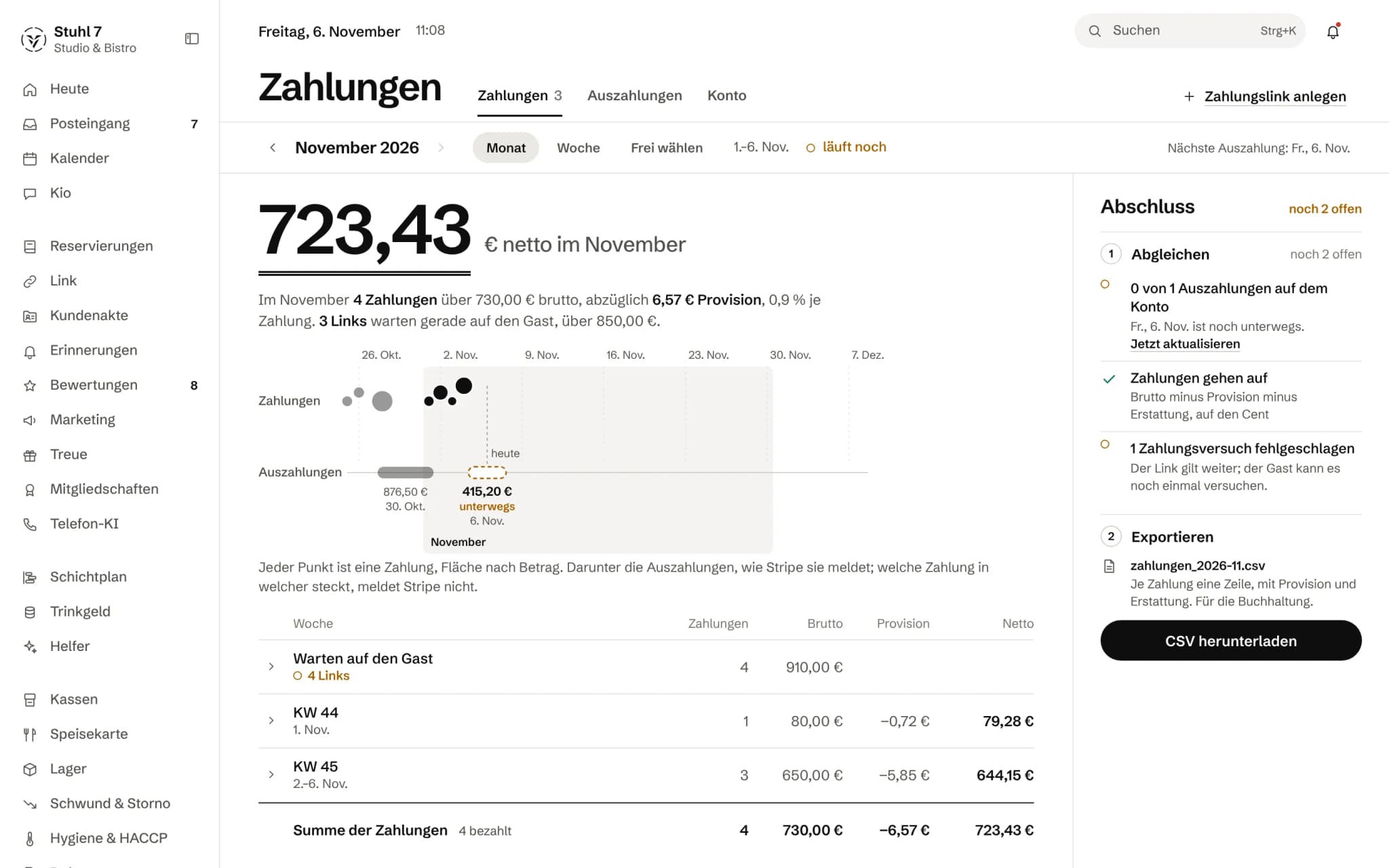
Net for the month
What remains after the fee, plus payments and links still waiting.
Payments and payouts
Each payment a dot sized by amount; below it, what has been paid out.
Weeks and open links
Gross, fee and net per week; open links on top.
More about Payments
Stripe Connect is the payment infrastructure behind it, and the money lands in your connected account. You are the merchant, not Veydex.
A payment
From the link to the money and back again.
You are the merchant, not Veydex.
- 01A company party wants to pay up front. In the Payments area you create a link for the deposit and send it.
- 02The guest pays. Through Stripe Connect the money lands in your connected account.
- 03Two days later two seats fall away. You refund part of it, right on the same payment.
- 04The payout view shows what reaches you, and when.
What is inside.
- Payment links
- Stripe Connect
- Refunds
- Cancellations
- Payout overview
- Payment reconciliation
A deposit inside the booking flow does not exist yet — reservations cannot be secured with it today.
Ask Kio
Ask Kio how it works.
Kio answers from the same help articles as on veydex.com and links the article. If he finds none, he says so instead of making up a path.
Kio never moves money: refunds are yours to make.
Kio comes with every business: occasional questions are included in the Hub.
Meet Kio- You: How do I refund a payment?
- Kio:
In Payments, open the paid payment and choose “Refund”. Leave the amount empty and everything is refunded. Only the owner may refund.
FromRefund a payment
Payment links into your own account. With you as the merchant, not Veydex.
Veydex Payments creates payment links for a deposit, a catering order or a membership charge. The guest pays at the payment service provider, the money goes to your connected account, and the Hub shows payments, refunds and payouts together.
01
Account
You connect your own account with the payment service provider once, and from then on Veydex takes money on your behalf.
Your own account, your own merchant
A connected account of your own is created at Stripe for your business. Every payment runs directly into it, and you are the merchant.
Set-up at the payment provider
Details about the business, your identity and your bank account are entered at Stripe, not in the Hub. If you stopped halfway, you carry on where you left off.
What is missing is listed
As long as the account is not enabled, the Hub shows the list of what Stripe still needs, rather than just “not ready yet”.
No link before approval
Payment links can only be created once Stripe has enabled the account. A guest never lands on an error page you would only hear about from them.
02
Payment links
A link with an amount and a purpose that you send to the guest.
Amount, purpose, validity
You set the amount, the purpose and how long the link is valid, up to thirty days. The guest's name and email address are optional.
A link that stays valid
The link points to a fixed Hub address. If the checkout session at the payment provider expires, the Hub opens a new one behind it, and until the deadline the guest always finds a page where they can pay.
Paid means confirmed
A payment only shows as paid once Stripe reports it. If a card is declined, the link stays open and the guest tries again.
Withdrawing
You can withdraw an open link, and the checkout session is closed with it so nobody can pay through it any more. Once paid, a refund is the way.
For membership dues
From Memberships, an open charge gets a link for exactly that amount. Once it is paid, the charge is settled.
03
Refunds
In full or in part, without money going out twice.
In full or in part
You refund the whole amount or part of it. The Hub does not allow more than was taken and tells you how much can still be refunded.
Owner only
Only the owner may refund. Every refund appears in the Hub's audit log with purpose and amount.
No double money
Two clicks or two open windows do not lead to two refunds. Veydex records the refund first and only then passes it to Stripe.
04
Overview
What was taken, refunded and paid out, on one timeline.
Gross, fee, net
Each payment shows what the guest paid, what goes off as the fee, what was refunded and what stays with you.
Payouts
Stripe's payouts to your bank account appear alongside with amount, status and date, the next one with its date.
Checks before export
Before you export, the Hub checks whether each payment's figures add up, whether payouts have arrived and which attempts failed.
Export for the accounts
Payments and payouts for a period go to your accountant as a CSV, with gross, fee, refund and net per payment.
Fee fixed on the payment
The fee is recorded when a payment is created. If the rate changes later, nothing changes on old payments.
What it does differently. And why that matters.
Who in the business gets what out of it.
Technical details and data
Payment service provider
Stripe, through Stripe Connect. A connected account of your own is created for your business, and you have your own contract with Stripe under its terms.
Law
Veydex provides no payment services and holds no money for you. Checking your identity and the anti-money-laundering requirements are the payment service provider's responsibility.
Card data
The Hub neither sees nor stores card numbers. Payment happens on the payment service provider's page.
Costs
The payment service provider's fees come on top of the per-transaction fee. Stripe bills them to you directly. The module has no monthly charge.
Booking
Only what Stripe confirms counts as paid. A notification that arrives twice is booked once.
Helpers
The helpers see open payments only as a total and an age, without guests' names. They cannot move money.
What it does not do today
Listed here so you know before, not once you are running it.
On your own booking page and on Veydex Link the booking flow does not ask for a deposit yet.
Reservations there cannot be secured with it today.
Veydex does not charge a no-show fee by itself.
The Hub does not send payment links itself.
You copy them and send them your own way.
Stripe does not tell the Hub which payment is in which payout.
Both appear on the same timeline, but without matching.
There is no reconciliation against the bank statement and no month-end close.
Card terminals and payments at the till are not part of this module.
Stronger together. Payments and the rest.
All modules work on the same data. What Payments knows, the others know too. Switch on what you need and see straight away what it costs together.

Your selection
0 €a month
- Payments0.9 %
Payments adds 0.9 % per transaction.
Keep building in the calculatorNet. Try it for 14 days, the trial ends by itself.
Payments costs
0.9 %per transaction
- 0.9 % per transaction, plus the payment service provider's fees
- Through your own merchant account
- No monthly amount
- No base fee, no bundle
Questions before you start
What businesses want to know before they switch it on.
Who is the merchant for a payment?
You are. The payment goes directly into your connected Stripe account, the guest's bank statement shows your business, and Veydex only keeps its fee.
What does it cost me besides the fee?
Stripe's fees, which Stripe bills to you directly. The module has no monthly charge and no base fee.
Can I secure reservations with a deposit?
Not in the booking flow yet. You can send a guest a payment link for a deposit for a party, but the Hub does not make the reservation depend on it.
How long is a payment link valid?
As long as you set when creating it, up to thirty days; the default is three days. Until then the link stays the same, even when the Hub opens a new checkout session behind it.
What does the Hub see of the guest's card?
Nothing. The guest enters their details on Stripe's page. The Hub holds amount, purpose, status and, if entered, name and email address.
Can I refund only part of a payment?
Yes, in full or in part, up to what has not been refunded yet. Refunds are made by the owner.
What if the money only arrives later?
If the payment page offers a method where the money is on its way for a while, such as a direct debit, the payment shows as on its way until it is confirmed. During that time the Hub does not offer a second way to pay.
Do I need a till for this?
No. Payments takes money without a till: for the party, the catering or the membership charge. Payments at the till and the card terminal are not part of this module.