
 Reviews
Good reviews do not happen by accident.
Good reviews do not happen by chance — but neither do they come from a filter that screens out unhappy guests. Veydex asks everyone, and collects every answer in the same place.
More feedback. No review tricks.
Veydex asks guests for feedback automatically after their visit and collects the answers in one place.
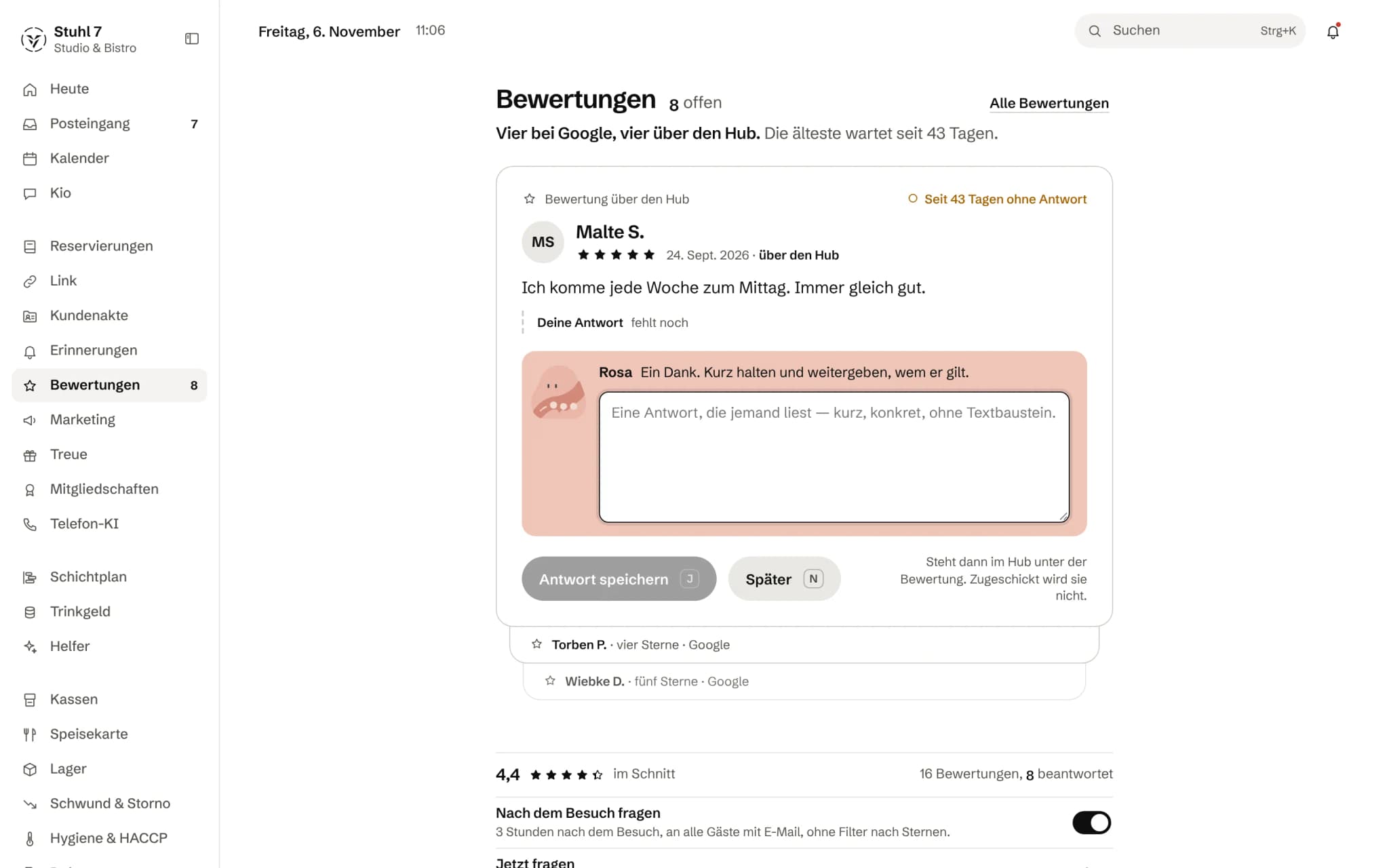
One at a time
Open reviews as a stack, the oldest on top, with the days without a reply.
A hint for the reply
The helper Rosa says what matters in this reply. You write it.
Google and the Hub together
Reviews from Google and from the Hub in the same stack.
Asking after the visit
Three hours later, to every guest with an email address, with no filter by stars.
More about Reviews
It does not send only the happy ones outward. Every review is treated the same — transparent, with no star gate.
After the visit
Feedback as a fixed part of guest contact.
No star gate. Every review is treated the same. Replies to Google reviews are still written at Google.
- 01The guest has left. After the waiting time you set, Veydex asks them for a review by email.
- 02The Hub records whom Veydex asked and whom not, with the reason.
- 03A three-star review sits in the same stack as all the others — not in a filter that makes it invisible. Whatever has no reply yet sits at the top.
- 04The report shows the average over ninety days, the spread of stars and how many requests were answered.
What is inside.
- Automatic review request
- The same link to your public profile for everyone
- Open feedback
- 90-day analysis
- Rating distribution
Requests follow visits from Reservations; without the Reservations module no request goes out. Replies stay in the Hub. You still answer Google reviews on Google.
Ask Kio
Ask Kio how it works.
Kio answers from the same help articles as on veydex.com and links the article. If he finds none, he says so instead of making up a path.
Kio does not draft replies to reviews yet.
Kio comes with every business: occasional questions are included in the Hub.
Meet Kio- You: How do I reply to a Google review?
- Kio:
In Reviews, write your reply and choose “Copy and open Google”. Paste it there, then mark it as answered in the Hub.
Every guest is asked. Every answer counts the same.
After the visit, every guest with an email address gets the same request, however happy they seemed. The answers arrive in the Hub, and whatever still has no reply sits on top.
01
Asking
After the visit, every guest gets the same request.
After the visit
Once a reservation is marked “seated” or “walk-in”, the request goes out after the waiting time you set, between one hour and 14 days. Anyone who cancelled or did not show up is not asked.
Everyone, no filter
Every guest with an email address is asked. The only ones left out are those who said no, are blocked, have unsubscribed or left no address, never anyone because of how satisfied they are.
Preview before sending
Before you switch asking on or ask right away, you see how many guests it goes to, who is skipped and why, and the email word for word. Only your confirmation sends it.
Once per visit
Each visit gets at most one request, and one that has been answered is not followed up. When you switch it on, the Hub reaches back seven days at most.
In your venue's name
The request comes as an email from your venue, in the form of address you have chosen, with a button to rate the visit.
02
Collecting
Every review lands in the Hub, however many stars it has.
Stars and text, with context
An answer arrives in the Hub with one to five stars and, if the guest wants, a text. It is tied to the request, and so to the visit, and with Guest records to the guest.
The same link for everyone
The link to your public profile, on Google for example, does not depend on the number of stars. Someone who gives two stars gets the same one as someone who gives five.
Stars only, too
If a guest gives only stars and no text, the review still sits in the stack, with the hint that a short thank-you is enough.
Filtering
Filter by stars, or show only what still has no reply.
03
Replying
What is open sits on top.
The stack
The oldest unanswered review is on top, with a note saying how many days it has been waiting. With “Later” you move one to the end.
A hint per star rating
Above the reply field it says what matters for this many stars; for few stars, for example: apologise first and say what will change. A fixed rule, not a prescribed text.
Replies for Google
The Hub saves your reply. For Google you copy it, open your profile alongside, paste it there and mark the review as answered in the Hub.
On record
Every saved reply sits under the review with its date and in the venue's log.
04
Overview
Where things stand, in a few numbers.
Average and distribution
The average across all reviews and across the last 90 days, plus the distribution from one to five stars.
Open and response rate
How many reviews still have no reply, and what share of the requests from the last 30 days was answered.
Once a week with Rosa
If you use the helpers, Rosa speaks up once a week when reviews have been waiting for a reply for two days or more: how many are open, how many of them have three stars or fewer, and how the 30-day average has moved.
What it does differently. And why that matters.
Who in the business gets what out of it.
Technical details and data
Prerequisite
The occasion for a request is a visited reservation. Without the Reservations module the Hub asks nobody.
Address
The request goes to the email address in Guest records or, for an online booking, the one in the booking itself.
Timing
Between one hour and 14 days after the visit, 20 hours by default. Sending runs every hour.
Sources
Every review carries its source, and the stack shows it, for example that it came through the Hub.
Permissions
Settings, preview and sending are with the owner.
What it does not do today
Listed here so you know before, not once you are running it.
You reply to Google reviews on Google; the Hub cannot publish anything there.
Reviews from Google and other platforms do not come into the Hub; the interface has no button for entering them by hand.
Requests go out by email, not by SMS.
The module does not ask after appointments from the appointment book or after visits without a reservation.
The Hub does not draft replies; it gives a hint per star rating.
Stronger together. Reviews and the rest.
All modules work on the same data. What Reviews knows, the others know too. Switch on what you need and see straight away what it costs together.


Your selection
9 €a month
- Reviews9 €
Net. Try it for 14 days, the trial ends by itself.
Reviews costs
9 €/ month
- Try it free for 14 days, the trial ends by itself
- Cancel monthly, with fourteen days' notice to the end of a billing month
- No base fee, no bundle
- All prices net
Questions before you start
What businesses want to know before they switch it on.
Why do you ask unhappy guests too?
Because selecting by satisfaction would be misleading advertising and breaks the platforms' rules. And because it is the only way to find out what did not work on the last visit. Someone who gives two stars is treated like someone who gives five.
Can I reply to Google reviews directly from the Hub?
No, Google only accepts replies in its own profile. The Hub saves your reply, you copy it, paste it into the profile and then mark the review as answered.
When does the request go out?
After the waiting time you set, counted from the reservation of a guest marked “seated” or “walk-in”. Sending runs every hour; with “Ask now” you trigger it straight away, after a preview.
Who is not asked?
Anyone who cancelled or did not show up, anyone marked “Reminders: no” or blocked in Guest records, anyone who unsubscribed and anyone who left no email address. The preview shows the number per reason.
Do I need Reservations for this?
Yes, because the occasion for every request is the visited reservation. Without Reservations the Hub sends no requests, and no new reviews come in.
Does a guest get several requests?
No. At most one goes out per visit, and an answered one is not followed up. When you first switch it on, the Hub reaches back seven days at most, so no guests from last quarter get mail.
Do my Google reviews come into the Hub automatically?
Not yet. The Hub does not fetch them, and the interface has no way to enter them by hand today. You reply to Google reviews in your Google profile.
Feedback becomes a fixed part of guest contact instead of something to remember eventually.