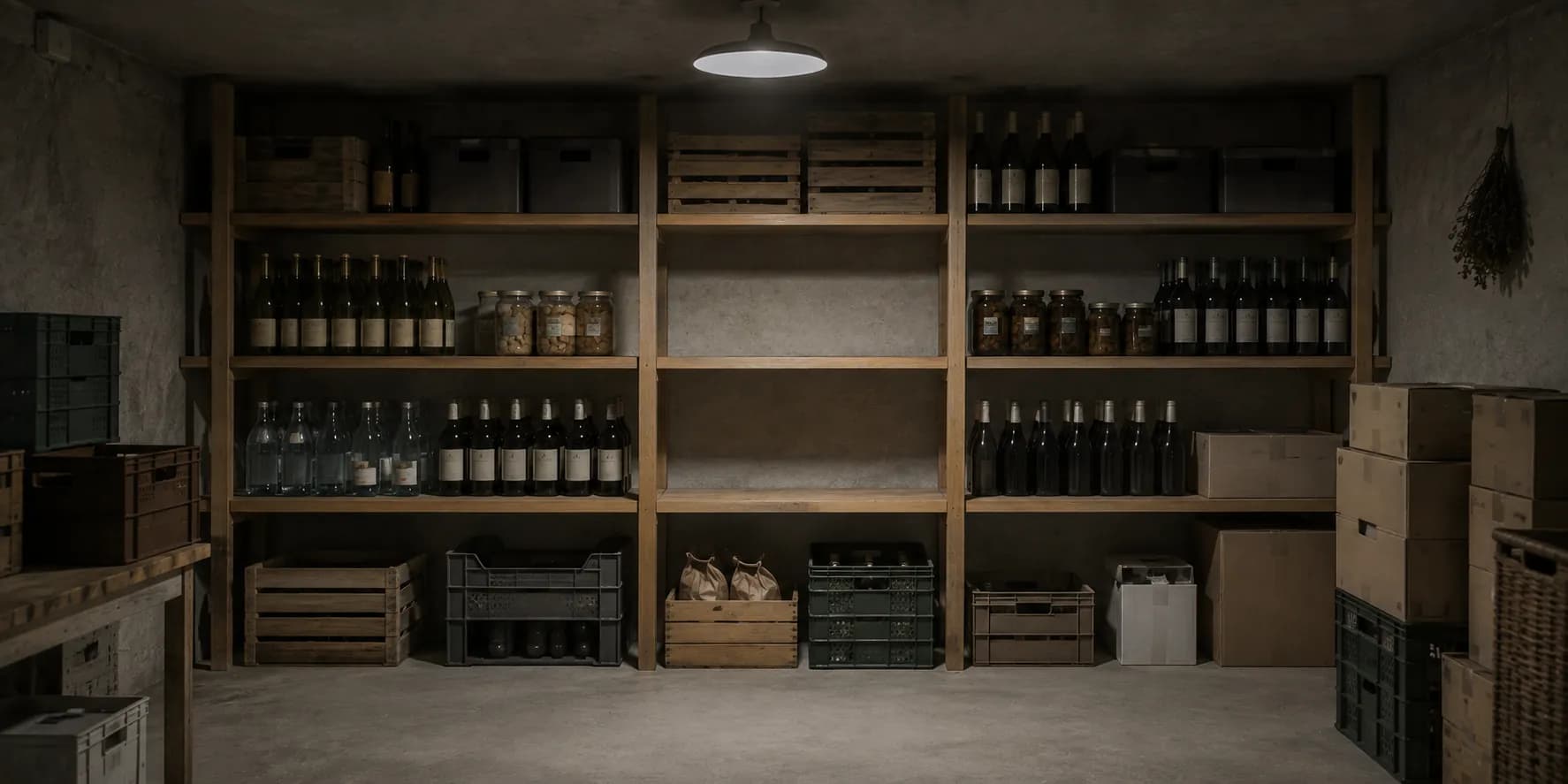
 Stock
Know what is there. Understand where it goes.
Between what sits in the store room and what was sold, most businesses have an estimate. Veydex Stock replaces it with arithmetic.
Your stockroom should not be a black box.
Veydex Stock connects stock levels, deliveries, recipes and sales.
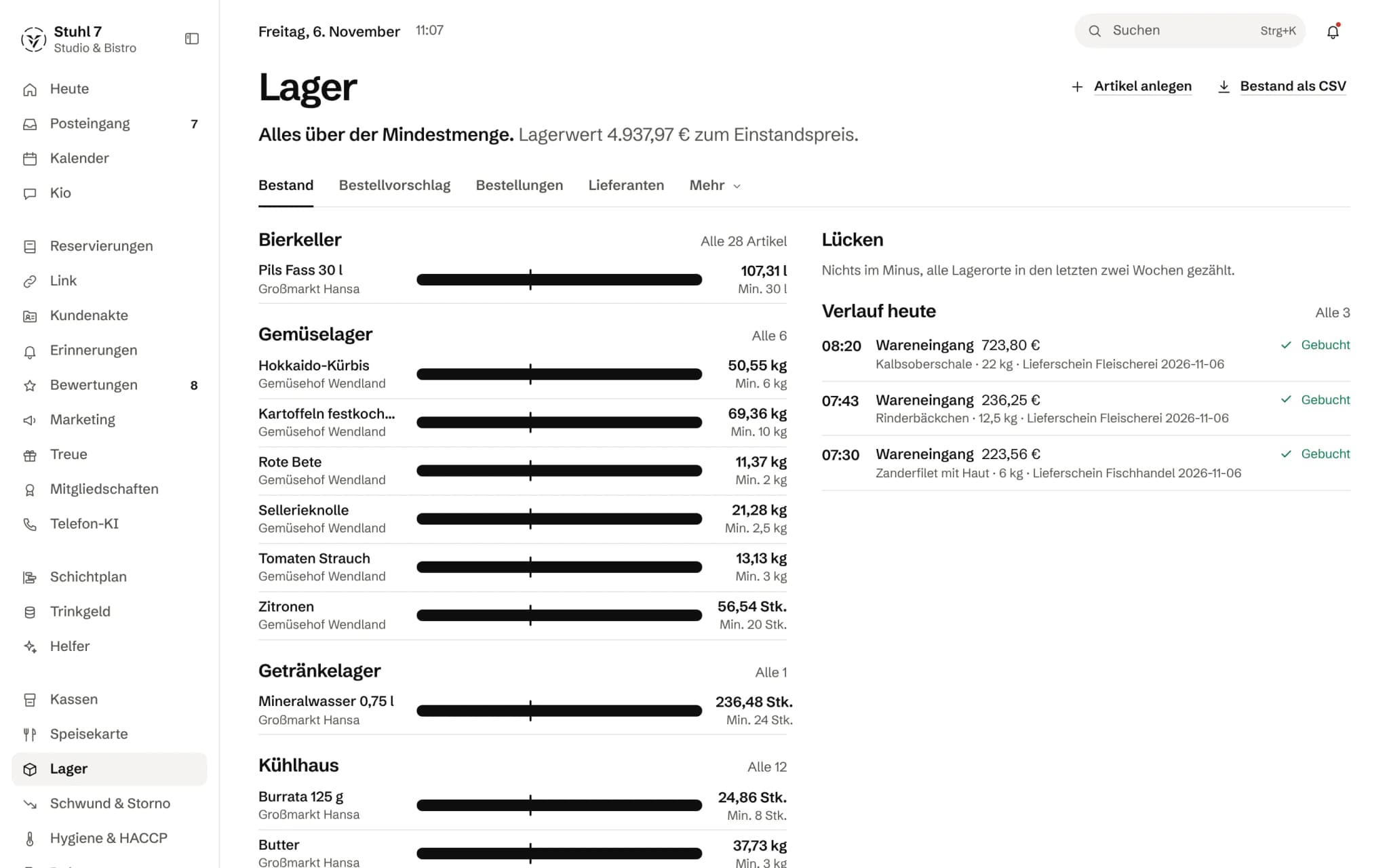
Status and stock value
One sentence says whether anything is below minimum, next to the stock value at cost.
Stock against minimum
One bar per item, the line marks the minimum. Grouped by storage location.
Gaps
Whether anything is below zero and whether every location was counted in the last two weeks.
Today's deliveries
What arrived today, with its delivery note, booked.
More about Stock
You see not only what sits in the store, but what gets used, what should be reordered, and how your cost of goods is moving.
Stocktakes are documented as traceable differences, order proposals come out of booked consumption, and supplier invoices stay attached to the transaction.
An evening and the morning after
62 portions, and the target is set.
At month end nothing is estimated. It is compared.
- 23:30The evening is done. 62 portions went across the till.
- 23:30Through the recipes, Veydex works out how much stock they should have used. That is the target in the cost of goods.
- 07:00The order proposal is ready — from the consumption booked over recent weeks, not from a hunch.
- Month endThe stocktake brings the actual figure. The difference to the target is a documented number, not a suspicion.
What is inside.
- Stock levels
- Goods in
- Stocktake
- Recipes
- Suppliers
- Order proposals
- Orders
- Cost-of-goods ratio
- Supplier invoices
Sales do not deduct stock by themselves. Consumption comes from your bookings and the differences found at stocktake; till receipts feed into the target cost of goods through the recipes.
Ask Kio
Ask Kio instead of searching.
Kio reads along in the areas you have booked and answers in whole sentences, with the figures and where they come from.
Kio never places an order himself.
Kio comes with every business: occasional questions are included in the Hub.
Meet Kio- You: What will run low by Friday?
- Kio:
Espresso beans and lemons, everything else lasts. If you like, I lay out an order draft; you place the order yourself afterwards.
Stock that explains itself. Down to the single entry.
In Stock, goods in, consumption, stocktakes and recipes hang together. From them the Hub works out order proposals with the working shown, and a cost of goods that says where the difference comes from.
01
Stock levels
What sits in the store room follows from what was booked, and you can trace it down to the single line.
The sum of the entries
The stock level is the sum of all movements: goods in, consumption, waste and stocktake. Nobody ever sets it by hand, so for every article you can trace it back line by line.
Moving average cost
Every delivery booked with a price moves the article's average purchase cost. A single expensive delivery therefore does not make the costing of your dishes jump.
Packs and units
You keep articles in grams, millilitres or pieces, with pack size and pack price. You book either in packs or in the unit; the conversion happens once, at the point of entry.
Below zero as a signal
If a stock level goes below zero, the Hub still accepts the entry and moves the article to the top. Almost always a delivery is missing, and booking it is better than bending the stock level into shape.
Stock value
The value of the store room is shown at purchase cost, per article and in total.
02
Stocktake
You count at the shelf; what gets booked is the difference.
One round per storage area
On your phone you go through one storage area after another, one article per screen, with a large number pad. Each article shows when it was last counted.
Difference, not overwrite
A stocktake does not reset the stock level. It books the gap to the calculated level, in quantity and in euros, because that figure is the reason you count.
Asking for the reason
If a count is clearly off, the Hub asks why: used and not booked, spoiled, delivery not booked, miscounted last time. The difference is booked either way.
Corrections leave a trace
What has been entered is a record. A correction needs a reason, and the old figure stays visible.
03
Order proposal
What should be reordered, how much, and why exactly that much.
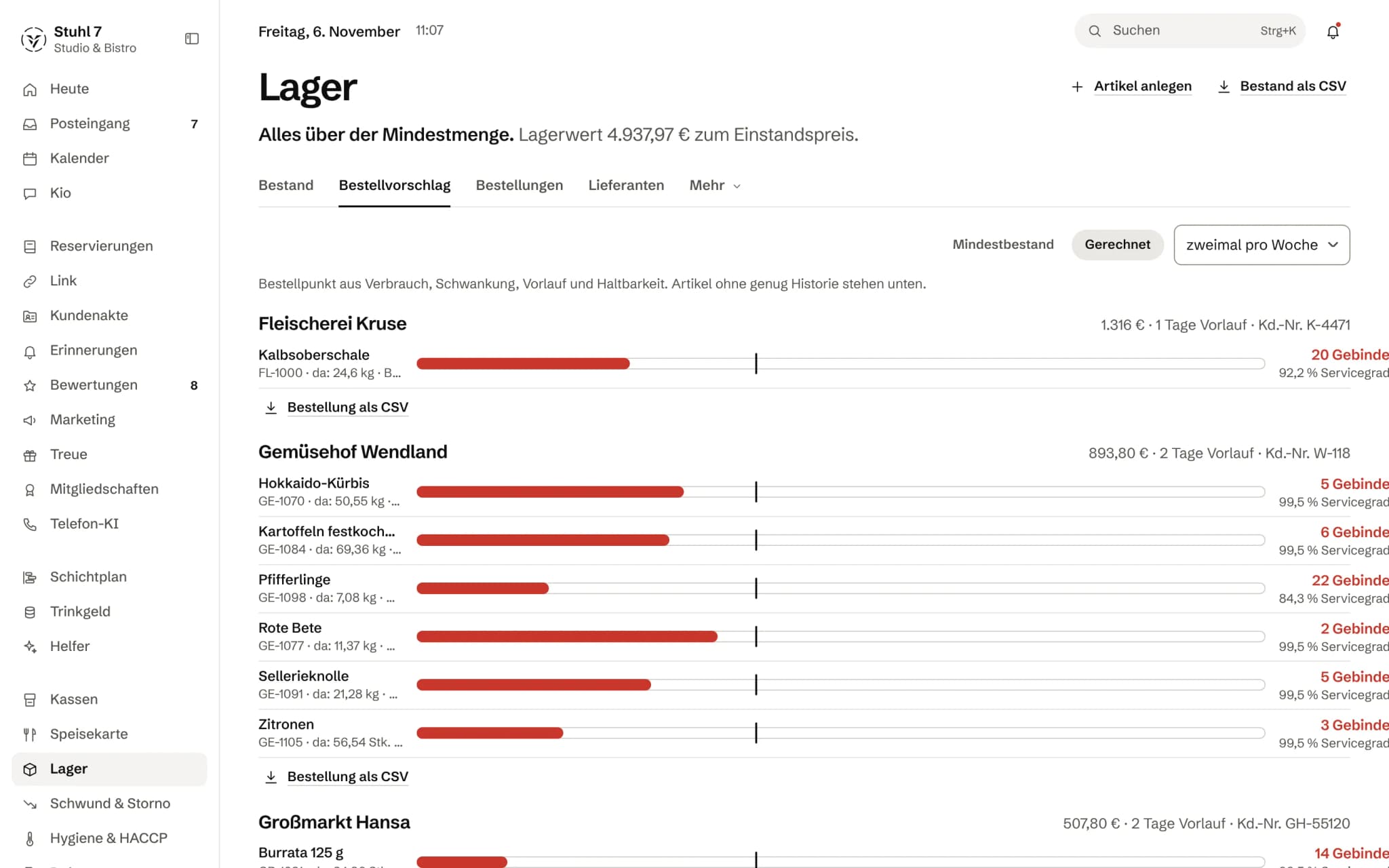
Two calculations side by side
One shows what is below the minimum stock you entered. The other works out a reorder point from the booked consumption of recent weeks, the supplier's lead time and how often you order.
Shelf life matters
Goods that would spoil before they are used get less buffer than flour. The shelf life cannot be entered on the Stock screen yet; until then the Hub uses a default and says so on the line.
Working shown on every line
Every line opens up to show how the quantity came about: consumption per day, lead time and ordering rhythm, safety stock, and how many days the calculation rests on.
No proposal without a basis
If an article's history is not long enough yet, the Hub deliberately proposes nothing for it. Those articles are listed separately, and the minimum stock stays in charge of them.
In whole packs
Proposals come in whole packs, grouped by supplier, with lead time and customer number. If an order falls below the supplier's minimum order value, it says so.
04
Supplier invoices
The cost side comes in without anyone typing prices.
Reading e-invoices
The Hub reads XRechnung and ZUGFeRD with their lines, quantities and unit prices. A PDF without embedded invoice data is filed and marked as unreadable; no prices are guessed.
Matching lines
The Hub matches invoice lines to stock articles, by this supplier's article number or by a name that fits exactly once. Anything ambiguous stays open until you decide.
Booking after approval
Nothing is booked as goods in until you approve the invoice. If the sum of the lines differs from the invoice total, you have to confirm that explicitly.
The price on the article
Booking feeds the price into the purchase cost, and the latest purchase price shows on the article. That is where a price rise gets noticed first.
05
Recipes and cost of goods
What a dish costs in ingredients, and why more is gone at month end than was sold.
Recipes from stock articles
A dish on the menu gets a recipe made of stock articles and quantities. From it the Hub calculates the cost per portion and the cost-of-goods ratio against the net price.
Gaps stay visible
If an ingredient has no purchase cost yet, it is marked as a gap and not counted as zero. Only a complete recipe writes its cost to the menu article.
Theoretical against actual
Theoretical usage is the portions sold on your till receipts times the recipe. Actual usage is opening stock plus purchases minus closing stock. Both are valued at purchase cost.
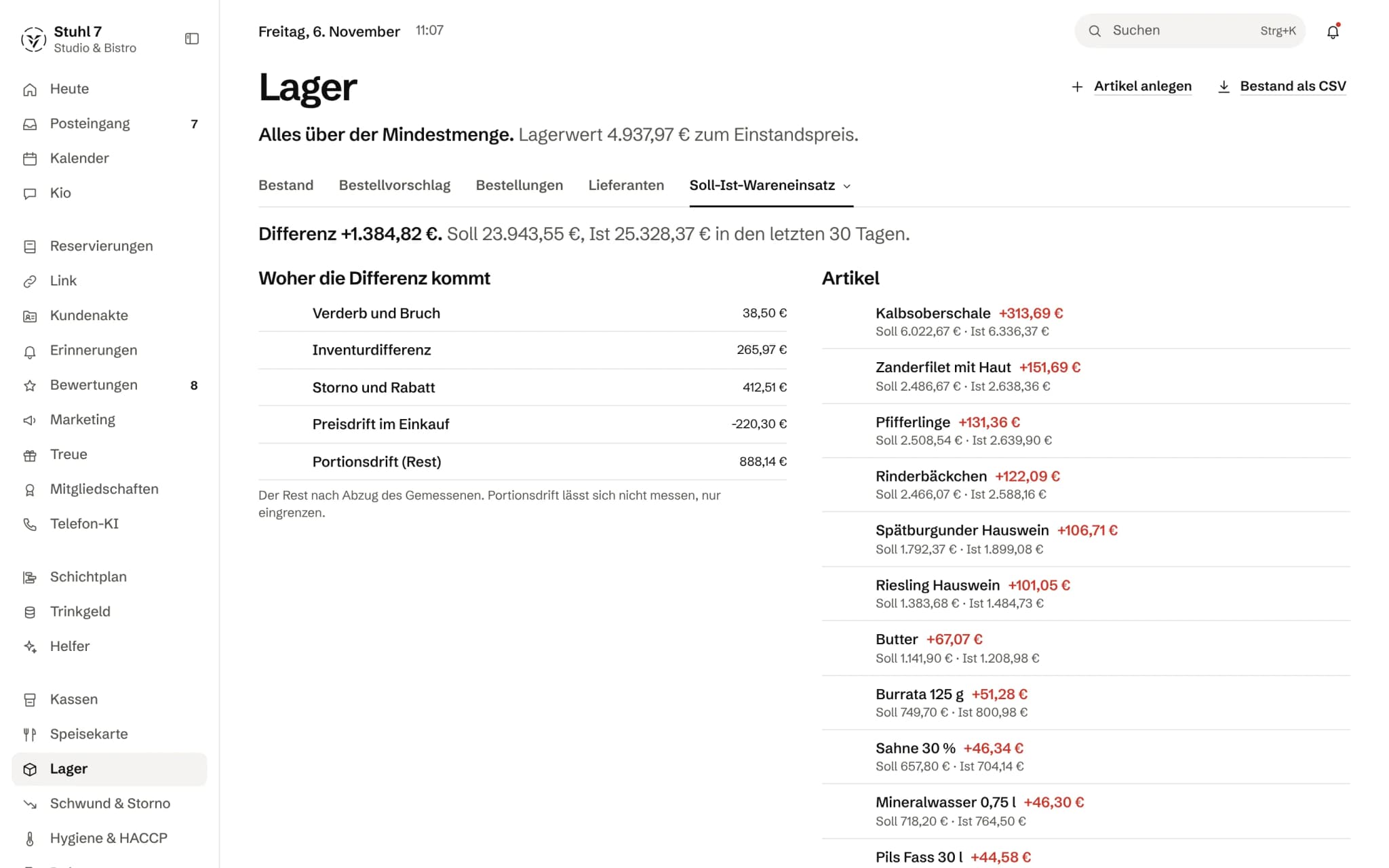
Where the difference comes from
The Hub breaks the difference down into waste and breakage, stocktake difference, voids and discounts, purchase price drift, and a remainder: portion drift. The remainder is explicitly a remainder, not a measurement of its own.
What the figure rests on
Next to it you see what share of revenue has a recipe, when stock was last counted, and which articles are used without appearing in any recipe.
What it does differently. And why that matters.
Who in the business gets what out of it.
Technical details and data
Arithmetic
Quantities are stored as whole numbers in thousandths of a gram, millilitre or piece, purchase costs in thousandths of a cent. No stock level drifts through rounding, and 0.2 g of saffron in a recipe stays 0.2 g.
Data and export
Stock as CSV, order proposal per supplier as CSV. Articles with entries are never deleted, only retired; their movements remain so that the stock value is right for every earlier cut-off date.
Requirements
Recipes need the Menu module. For theoretical usage you also need till receipts with line items that are matched to menu articles.
Supplier invoices
XRechnung as UBL or CII, ZUGFeRD and Factur-X as a PDF with embedded data, up to 10 MB per file. A line can only be booked if the stock article has a pack size.
With the Helpers
Ben, the buyer among the Helpers, turns the proposal into draft orders with quantity, supplier and total. He sends nothing and books no goods in.
What it does not do today
Listed here so you know before, not once you are running it.
Sales do not deduct stock by themselves.
Consumption comes from your bookings and the differences found at stocktake; till receipts feed into the target cost of goods through the recipes.
The Hub does not send orders.
You order as before, by phone, email or in the supplier's portal, and then mark the order as sent.
The Hub does not read scanned invoices without embedded data.
There is no text recognition.
You create stock articles one by one.
There is no import for article lists.
Valuation uses the moving average cost, not the order in which goods were bought.
Without a stocktake, the actual figure in the cost of goods is carried forward rather than counted.
The Hub says so next to the figure.
The calculated order proposal looks at the booked consumption of recent weeks.
It knows nothing about reservations, holidays or events.
Stock does not track batches or nested storage areas.
A shelf life per article cannot be entered on the Stock screen yet.
Stronger together. Stock and the rest.
All modules work on the same data. What Stock knows, the others know too. Switch on what you need and see straight away what it costs together.



Your selection
24 €a month
For new bookings from 1 December 2026: 39 € a month. Book or start your trial before then and you keep your price.
- Stockfrom 1 December 2026: 39 €24 €
Net. Try it for 14 days, the trial ends by itself.
Stock costs
24 €/ month
- For new bookings from 1 December 2026: 39 € a month. Book or start your trial before then and you keep your price.
- Try it free for 14 days, the trial ends by itself
- Cancel monthly, with fourteen days' notice to the end of a billing month
- No base fee, no bundle
- All prices net
Questions before you start
What businesses want to know before they switch it on.
Do I also need the Menu module?
Not for stock levels, suppliers, goods in, stocktakes and order proposals. Recipes hang on the articles of the menu; without it there is no costing per dish and no theoretical usage in the cost of goods.
How good is the order proposal at the start?
At the start there is no calculated proposal for an article yet. The Hub first needs a while of booked consumption; until then the minimum stock you enter applies. After that, every line says how many days the calculation rests on.
What about supplier invoices that only come as a PDF?
If the PDF carries embedded ZUGFeRD data, the Hub reads the lines. A plain scan is filed and marked as unreadable; you then book the delivery on the article by hand. No price is guessed.
Does Veydex send orders to my suppliers?
No. You send an order yourself, by phone, email or in the supplier's portal. You then mark it as sent in the Hub, and you book the goods in when they arrive.
How reliable is the difference in the cost of goods?
As reliable as your recipes and stocktakes. Next to the figure you see what share of revenue has a recipe and when stock was last counted. If that share is too small, the Hub says plainly that the difference points to missing recipes rather than shrinkage.
Can someone other than me do the stocktake?
Yes, the shift lead can count and book goods in, consumption and waste. Booking supplier invoices and marking orders as sent stays with the owner.
What does Ben do in Stock?
If you have booked the Helpers, Ben sees what drops below minimum stock and drafts an order with quantity, supplier and total. He sends nothing and books no goods in; what you do not need, you throw away.