
 Phone AI
When nobody can pick up the phone, Veydex does.
The phone rings in the middle of a rush anyway. Answer it and you leave the pass; do not answer and you lose the booking. The phone AI does not just answer the call — it completes it.
Your venue answers the phone.
While your team serves guests, the phone rings anyway.
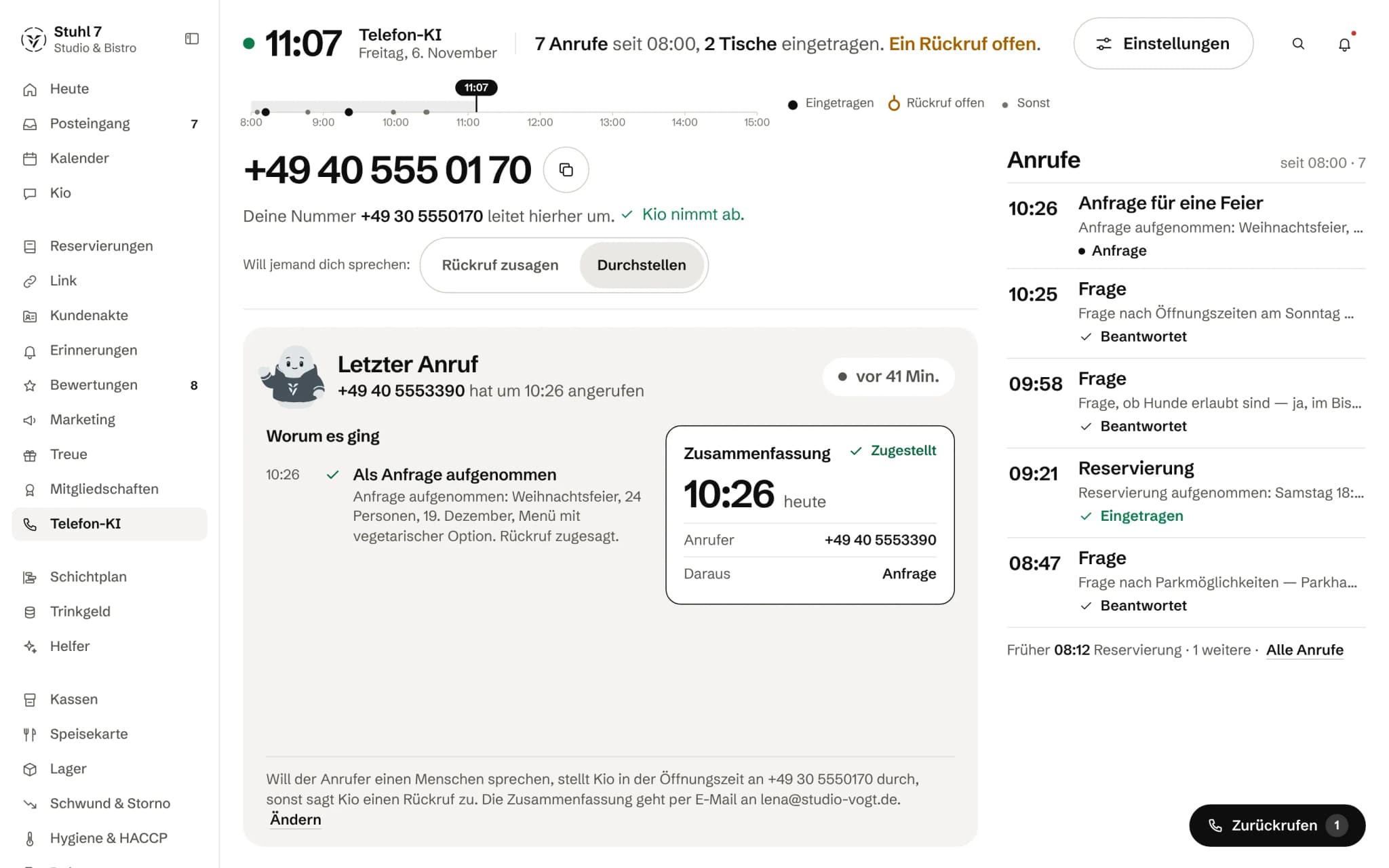
The day in one line
How many calls, what came of them and which callback is still open.
Your number stays yours
Your number forwards to the Veydex number, where Kio answers.
A summary per call
What it was about, what came of it, and that it was sent to you.
More about Phone AI
Veydex Phone AI takes calls, answers common questions, creates reservations and summarises conversations for your team.
The assistant knows your venue, your information and your FAQs. If a person needs to take over, the call can be handed on.
A call in Veydex
Nine seconds, and the table is booked.
Nobody had to interrupt service.
- 19:42:00The phone rings. Nobody at the pass has a hand free.
- 19:42:03“Do you have a table for four tomorrow at seven?”
- 19:42:06Veydex checks opening hours, table capacity and dwell time.
- 19:42:08The reservation is created.
- 19:42:09Your team sees it in the Hub.
What is inside.
- Own phone number
- AI phone assistant
- Creates reservations
- Venue knowledge & FAQs
- Call summaries
- Lead capture
- Human handover
- SIP
The Phone AI is excluded from the 14-day trial. Every minute on the phone has a cost, so it always starts on a plan.
Ask Kio
Ask Kio instead of searching.
Kio reads along in the areas you have booked and answers in whole sentences, with the figures and where they come from.
Kio comes with every business: occasional questions are included in the Hub.
Meet Kio- You: Which call-backs are still open?
- Kio:
Two: a guest asking about a table for twelve on Saturday, and a supplier asking about an invoice. I will give you names once you allow me to see them.
On the phone when nobody can be. Working in your reservation book, not next to it.
The Phone AI answers calls on your existing number, replies to questions from the knowledge you store, books tables and appointments against your real availability and hands over wherever a person is needed.
01
Line
Your number stays yours. You forward it, and Veydex sets up the rest.
Two details to start
Your business name and the number guests call you on today. Everything else has a default you can change later.
Line and voice service from Veydex
Veydex provides a phone number from its stock and sets up the voice service behind it. You do not need an account with an AI provider.
Forward only once it rings
The Hub only shows the forwarding instructions once the line is really live. Before that it tells you not to forward yet, so your business does not ring into nothing.
One switch
Switched on, the Phone AI works for your business. Switched off, it books nothing and answers no questions from your knowledge, with immediate effect.
Try it before the first call
In the browser you talk to your Phone AI before a number is live. As text, you type in questions and see what it would answer and why; nothing is stored and nobody is notified.
02
Knowledge and voice
What the Phone AI says comes from what you store.
Answers only from the knowledge
It answers factual questions from your entries, one answer per topic. If something is not there, it says so and offers a handover.
Starter knowledge instead of a blank page
When it is set up, Veydex creates entries for the most common questions, with your opening hours, for you to sharpen.
Voice and tone
You listen to voices in phone quality with your own greeting and choose tone and pace. Whether callers are addressed formally or informally follows the same setting as your emails and booking page.
Choices instead of free text
You choose tone and pace from given options. As free text you write the greeting, short notes about your business and what it must never say. These texts rank behind the fixed rules Veydex stands behind and do not override them.
Hours from one source
It announces your business's opening hours, the same ones reservations use. It knows closures and says that you are closed, but not why.
03
Booking
It books tables and appointments against the same availability as any other booking.
Tables with the Reservations module
It checks opening hours, capacity and dwell time and enters the reservation in the same book your team and your booking page use. If the time is taken, it offers free times close by.
Kitchen closing
After the kitchen closes it takes no more tables and tells the caller the time until which bookings are still possible.
Appointments with the appointment book
With the appointment book in Reminders it finds free slots by service and person and books them, for example in a hair salon or beauty studio.
Callback requests in the calendar
Even without other modules it puts callback requests and notes into your calendar.
Matched, not changed
With Guest records, a phone reservation is matched to the right guest by number. What a caller says does not change an existing record.
04
Handover
Where a person has to decide, it hands over.
Transfer or callback
If someone wants to speak to you, it puts them through to your number during opening hours, if you set it up that way. Otherwise, and during holiday closures, it promises a callback.
Parties and large groups as enquiries
From a group size you set, it books nothing and instead takes the enquiry for you, with occasion, number of people and preferred date. You get back to them in person.
No promises on goodwill
It never decides on vouchers, discounts, goodwill or complaints. It records them and passes them on to you.
When callers are upset or unclear
If a caller gets angry, asks for a person or it fails to understand them twice, it hands over.
05
After the call
Every call is in the Hub, with what came of it.
A summary per call
At the end of every call it records what it was about, who called and whether anything needs doing.
Callbacks one by one
Open callbacks are in a list, one after the other, with the number to dial and a button to mark them done.
The day as a strip
At a glance you see the day's calls: booked, callback open or answered.
Minutes before the invoice
How many minutes the month has used and what falls outside the allowance, you see in the Hub before the invoice arrives.
Calls as CSV
The list of calls with their summaries can be exported as a CSV.
What it does differently. And why that matters.
Who in the business gets what out of it.
Technical details and data
Recording
The Hub does not store the wording of a call. It stores the summary, the caller's number and what came of the call; for enquiries also name, occasion, number of people and preferred date.
Telling callers
What the caller hears first is set by your greeting. Veydex does not add a fixed sentence saying that an AI is speaking.
Voice service
Speech is processed by a provider Veydex engages. Which one, and where it processes, is still listed as an open point on the Security and data page.
Prerequisites
It books tables with the Reservations module and appointments with the appointment book in Reminders. Without either, it answers questions and takes callback requests and enquiries.
Giving it up
If you give up the Phone AI for good, the Veydex number goes back into stock after an explicit confirmation. Your own number never went anywhere; you simply undo the forwarding.
What it does not do today
Listed here so you know before, not once you are running it.
It cannot change or cancel an existing reservation.
For that it promises a callback.
It speaks German.
Other languages do not exist yet.
The summary is always in the Hub and can also go to Slack.
Delivery by email or WhatsApp can be selected but is not connected yet.
Enquiries and call summaries are not attached to the guest record yet.
The phone reservation is.
It does not recognise a regular on the phone and does not know their history during the call.
It does not take orders for pickup or delivery.
Set-up happens on a computer.
On your phone you see the calls and call back.
Stronger together. Phone AI and the rest.
All modules work on the same data. What Phone AI knows, the others know too. Switch on what you need and see straight away what it costs together.


Your selection
39 €a month
- Phone AI39 €
Phone AI on the Basic plan, with no trial. The other plans are listed below.
Keep building in the calculatorNet. Try it for 14 days, the trial ends by itself.
Phone AI costs
from 39 €/ month
- No trial: starts straight away on the plan you choose
- Cancel monthly, with fourteen days' notice to the end of a billing month
- No base fee, no bundle
- All prices net
Three plans, each with minutes included. Anything beyond is charged per minute. There is no trial here: every minute on the phone has a cost, so the Phone AI starts straight away on a plan.
Basic
39 €
a month
200 minutes included, then €0.19 per minute
Standard
89 €
a month
500 minutes included, then €0.16 per minute
Full
199 €
a month
1,100 minutes included, then €0.15 per minute
Questions before you start
What businesses want to know before they switch it on.
Do I have to change my phone number?
No. You forward your number to the Veydex line, usually with a code from your phone provider. Guests keep dialling the number they know.
Are calls recorded?
Not in the Hub. It stores the summary, the caller's number and what came of the call, meaning a reservation, an enquiry or a callback. The Hub does not keep the wording.
Do callers learn that they are talking to an AI?
You decide that with the greeting the Phone AI says first. Veydex does not add a fixed notice by itself today; if it should be said, it belongs in that sentence.
What happens if it cannot answer a question?
It says honestly that it does not know and offers to have someone get back to the caller. In the test run you spot such gaps in advance and add the right answer straight from there.
Can it create reservations?
Yes, with the Reservations module, against the same availability as any other booking. If the time is taken, it offers a free one close by. It cannot change or cancel a reservation.
What happens with a company party for thirty people?
From the group size you set, it books nothing. It takes the enquiry with occasion, number of people and preferred date, promises a reply, and you find it in the Hub under enquiries.
How do I know what a month will cost?
The Phone AI bills by plan and minutes. In the Hub you see at any time how many minutes are used and what goes beyond the allowance, and before a plan change what it costs and when it takes effect.
Can I try it before guests call?
Yes. In the browser you hold a test conversation with your Phone AI, and as text you type in questions and see what it would answer. Both work before your number is forwarded.