 Veydex Link
Get found, without a web agency.
A business needs an address on the web: for Instagram, for Google, for the guests who look first. Veydex Link gives you that page, with your offer, opening hours and enquiries, and it costs nothing.
Your page on the web. Free for good.
A business needs an address on the web: for Instagram, for Google, for the guests who look first. Veydex Link gives you that page, with your offer, opening hours and enquiries, and it costs nothing.
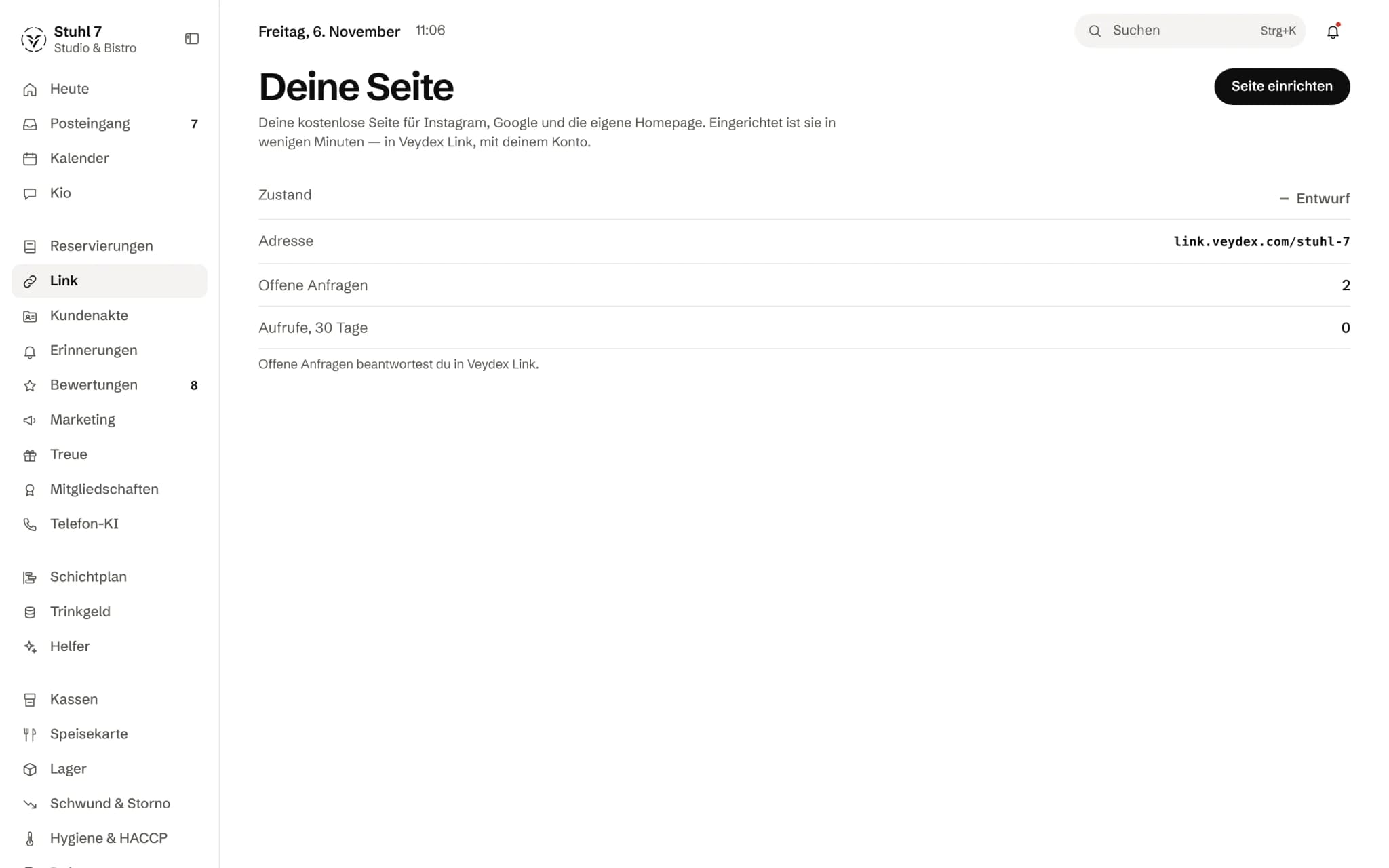
Draft or live
The status of your page, here still a draft.
Your address
The page lives at link.veydex.com followed by your business name.
Open requests
How many requests are open. You answer them in Veydex Link.
Set up in Veydex Link
You design the page in Veydex Link, with the same account.
More about Veydex Link
Choose a link for your Instagram profile, a whole website from templates for your industry, or single building blocks for the homepage you already have. With Reservations or Reminders guests book online, and what they ask lands in the Hub instead of your inbox.
What is inside.
- Link for Instagram
- Website from industry templates
- Building blocks for your own homepage
- Offer and opening hours
- Enquiries straight into the Hub
- Permanent QR codes
Ask Kio
Ask Kio instead of searching.
Kio reads along in the areas you have booked and answers in whole sentences, with the figures and where they come from.
Kio does not read an enquiry's name, number or message.
Kio comes with every business: occasional questions are included in the Hub.
Meet Kio- You: Is my page online, and are there new enquiries?
- Kio:
Yes, your page is up. Three enquiries are open; who sent them and what they say, you see in Veydex Link.
A page for your business. Built from the same data as your Hub.
Veydex Link is your presence on the web: a link for Instagram, a website from a template for your industry, or building blocks for the homepage you already have. Opening hours and photos come from the Hub, and what guests ask for goes back there.
01
Page
From the link in your bio to a whole website, without an agency.
Templates per industry
Restaurant, café, bakery, hotel, hair salon, garage, trades, medical practice and more: each industry has its template with suitable sections and a main action, such as requesting a table or booking an appointment.
Design in set steps
Typeface, alignment, order and your own headings are set in fixed steps. Free HTML or your own scripts are deliberately not possible.
Your offer from one source
You keep your menu, services or range on the page itself or take them from the Menu module or the appointment book. Allergens only appear if they have been checked there.
Draft and versions
Changes stay a draft until you publish. Every publication is a version you can view and bring back, and publishing can be scheduled too.
A notice for today
A notice such as “closed today” applies immediately, without publishing, and expires by itself after thirty days at most.
02
Enquiries
What guests want through the page lands in the Hub, not in your inbox.
Table requests in the book
The request appears in the Hub's reservation book, checked against opening hours, holidays, lead time and group size. You confirm or decline, with an email to the guest if you like.
Direct booking with a module
With Reservations a request becomes a booking. With the appointment book in Reminders, customers book free slots by service and person, instantly or with your confirmation, once you switch online booking on.
Every kind of enquiry
Message, callback, appointment, service, quote, event, trial session, feedback or complaint, depending on what fits your industry.
One thread instead of email ping-pong
Every enquiry has a thread. You reply or suggest another time, and the guest writes back or accepts the suggestion on their enquiry's page.
Received is not confirmed
The status page and the email tell the guest “received”, not “confirmed”. You do the confirming, and while it is open the guest can withdraw the enquiry.
03
Being found
The same page at your own address, on paper and in your homepage.
Your own domain
A domain only counts as connected once it provably belongs to you, points to Link and answers over HTTPS. If one of these checks fails, Link stops serving it.
QR codes that last
A QR code is never deleted, only archived, and always points to something on your own page. If you change the target of a code that has already been printed or scanned, you confirm it first.
Building blocks for your homepage
Enquiry form, opening hours, menu and a button for requests, as snippets to paste into the website you already have.
Insights as numbers
Views, actions opened, enquiries, sources and scans per day. No individuals appear there.
04
Day to day
Veydex points out gaps and takes care of small things, within the limits you set.
Suggestions with a reason
Public holidays without a rule, links that no longer work, gaps in the profile, enquiries waiting: Veydex names them, each with its reason.
Autopilot with a log
It sets a fallback action for dead links, clears expired offers from the draft, reminds you of public holidays and sends the weekly report. Every action is logged with its reason.
What it never does
Change prices or allergens, publish texts, buy domains, sign contracts, pass on customer data or book on a guest's behalf. There is no switch for any of that.
Emails in your page's look
Emails to your guests arrive under your business's name, with the logo, colours and cover image of your published page.
What it does differently. And why that matters.
Who in the business gets what out of it.
Technical details and data
Law
Link builds the legal notice from your details. For data protection you choose a standard text describing what Link itself does, your own text or a link to your existing policy. All texts are suggestions, not legal advice.
Guest data
Name, email, phone and message from enquiries are removed by Veydex after a fixed period; the number of enquiries remains. With the Reservations module you keep your own book.
Review
Certain content, such as bank details or payment requests, sends the first publication into a review by Veydex instead of putting it online straight away.
Export and deletion
You export the whole page as a single file. Deleting requires the page address as confirmation; your profile and reservation book remain.
Interfaces
The Hub reports publications, new and changed enquiries and changed QR code targets through webhooks.
Emails
Emails to guests go out under your business's name. At the very bottom a small line says they were sent through Veydex, with a pointer to Veydex Link.
What it does not do today
Listed here so you know before, not once you are running it.
A business has one page.
Further locations appear on it, not as a second page.
Guests can only book online with the Reservations or Reminders modules.
Without them they send an enquiry.
Link does not connect custom domains automatically yet.
You set the records with your domain provider, and the domain only counts as connected once every check passes.
Link does not buy domains.
Veydex suggests available names, and you buy from your provider.
A sender address of your own for emails to guests does not exist yet.
Anything that needs a third-party account, such as a Google Business Profile, delivery platforms or another provider's calendar, Link does not connect.
It links to it or takes details over as a suggestion.
There is no chatbot on the page, and none is planned.
Stronger together. Veydex Link and the rest.
All modules work on the same data. What Veydex Link knows, the others know too. Switch on what you need and see straight away what it costs together.
Your selection
0 €a month
- Veydex Linkfree
Net. Try it for 14 days, the trial ends by itself.
Veydex Link costs
freefor good
- Free for good
- No base fee, no bundle
- Combines with every other module
Questions before you start
What businesses want to know before they switch it on.
Does Link really stay free?
Yes. There is no plan the page moves into later and no paid extras inside it. If your business books a Hub module, it pays for that module, and nothing changes about Link.
Do I need the Hub for this?
You sign in to Link with the same account as the Hub. If you only use Link, the Hub shows a slim bar with Link, Marketplace, Billing and Settings; with your first additional module the rest appears.
Can I use my own domain?
Yes, up to three per page. You set the records with your domain provider, and Veydex checks that the domain belongs to you, points to Link and answers securely. Only then is it shown as connected.
Can guests book directly through the page?
With the Reservations module they book tables, with the appointment book in Reminders they book appointments, once you switch online booking on. Without those modules they send an enquiry, and you accept or decline.
Does that make the legal notice legally watertight?
Veydex builds it from your details and asks for the fields your legal form requires. Veydex does not present any text as legally watertight; you are responsible for the details and confirm them before publishing.
What happens to the data from enquiries?
Name, contact details, message and thread are kept with the enquiry in the Hub. After a fixed period Veydex removes them; the number of enquiries remains for your insights. For table requests this applies as long as you do not have the Reservations module, because with it you keep your own book.
I already have a website. Does Link still help?
Yes. You embed the enquiry form, opening hours or menu as building blocks in your website. Link can take details from your existing site as a suggestion; nothing is saved until you confirm it.
Can my team work on the page?
The shift lead edits the page and submits it to you for approval. Publishing, legal notice, domains, export and deletion stay with the owner.