Modules and billing
Prices, dependencies, cancelling. 15 articles
Articles on this topic
What does Veydex cost?
You pay per module, with no base fee. Modules cost between €9 and €29 net a month, for new bookings from 1 December 2026 between €9 and €39; book before then and you keep your price. The Phone AI costs from €39. Analytics, Veydex Link and occasional questions to Kio cost nothing, Payments costs 0.9% per transaction.Cancelling
You cancel with fourteen days' notice to the end of a billing month. Your till kept running the whole time and stays as it is.Why does a second module come along?
Some modules build on another: Loyalty, Marketing and Memberships need Guest records, Tips needs the Rota. You see that before booking, with the price.Book a paid module
Open the module in the Marketplace, choose the button with the price and then “Book now”. It is unlocked as soon as the first invoice is paid, on Stripe's invoice page or automatically with your saved payment method.A module can't be booked
Usually a requirement is missing: only owners book, some modules need another one first, and without a company name and address in the billing details no paid booking is possible. What exactly is missing is shown on the module in the Marketplace.What am I paying right now?
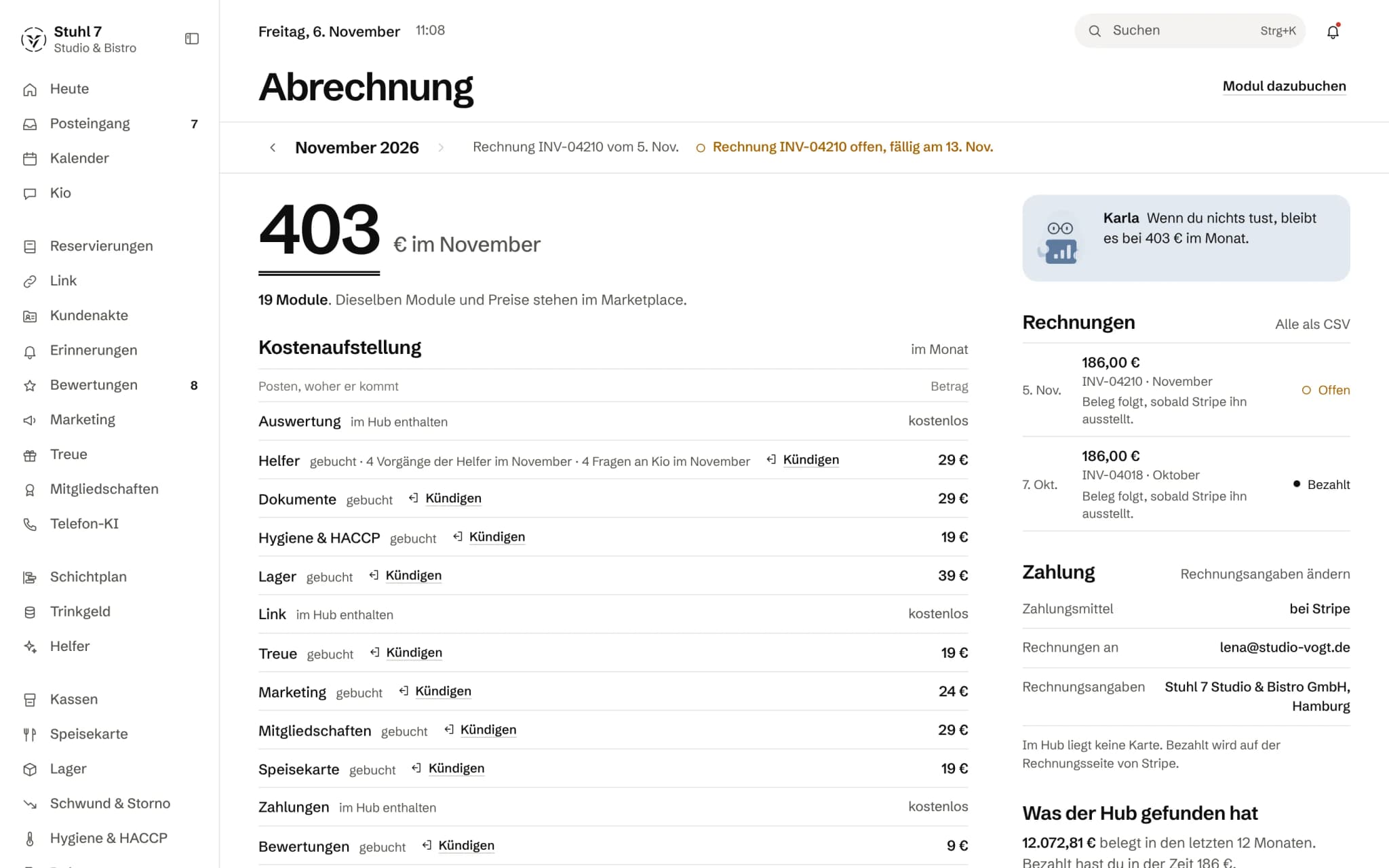
At the top of Billing you see what you pay this month, below it the cost breakdown per module. “If you do nothing” shows what changes next, such as a trial ending or the next invoice.What happens when the trial ends?
The trial ends by itself after 14 days, and nothing is charged. The module can't be used afterwards, but what you set up is kept; three days before the end the Hub reminds you by email.Keep a module after the trial
During the trial, choose “Keep” in Billing, in the inbox or on the module's page in the Marketplace. It stays free until the trial ends; the first invoice comes when the trial period is over.End a trial early
In Billing, choose “End trial” next to the module on trial and confirm once more. Nothing is charged, and your data stays.Take back a cancellation
As long as a cancelled module is still running, open it in the Marketplace and choose “Keep it running”. It then carries on as before.Can't cancel: another module needs it
A module that another booked module builds on can only be cancelled once the dependent one is no longer running. The Hub tells you which modules need it.Find and download invoices
All invoices are listed under Billing › Invoices, each with its status and as a PDF. “All as CSV” downloads the list, for example for your bookkeeping.Save a card or direct debit
Under Billing › Payment, choose “Add payment method” and enter a card or a bank account for SEPA Direct Debit. The Hub then charges new invoices to it automatically.Change billing details: company name, address, VAT ID
Under Billing › Payment, choose “Change billing details”. Without a company name and address no paid module can be booked, because we may not issue a valid invoice without them.Invoice open or payment failed
You pay open invoices under Billing with “Pay invoice” or with “Pay” next to the single invoice. If a charge failed, the email tells you why; you can try again or pay on Stripe's invoice page.